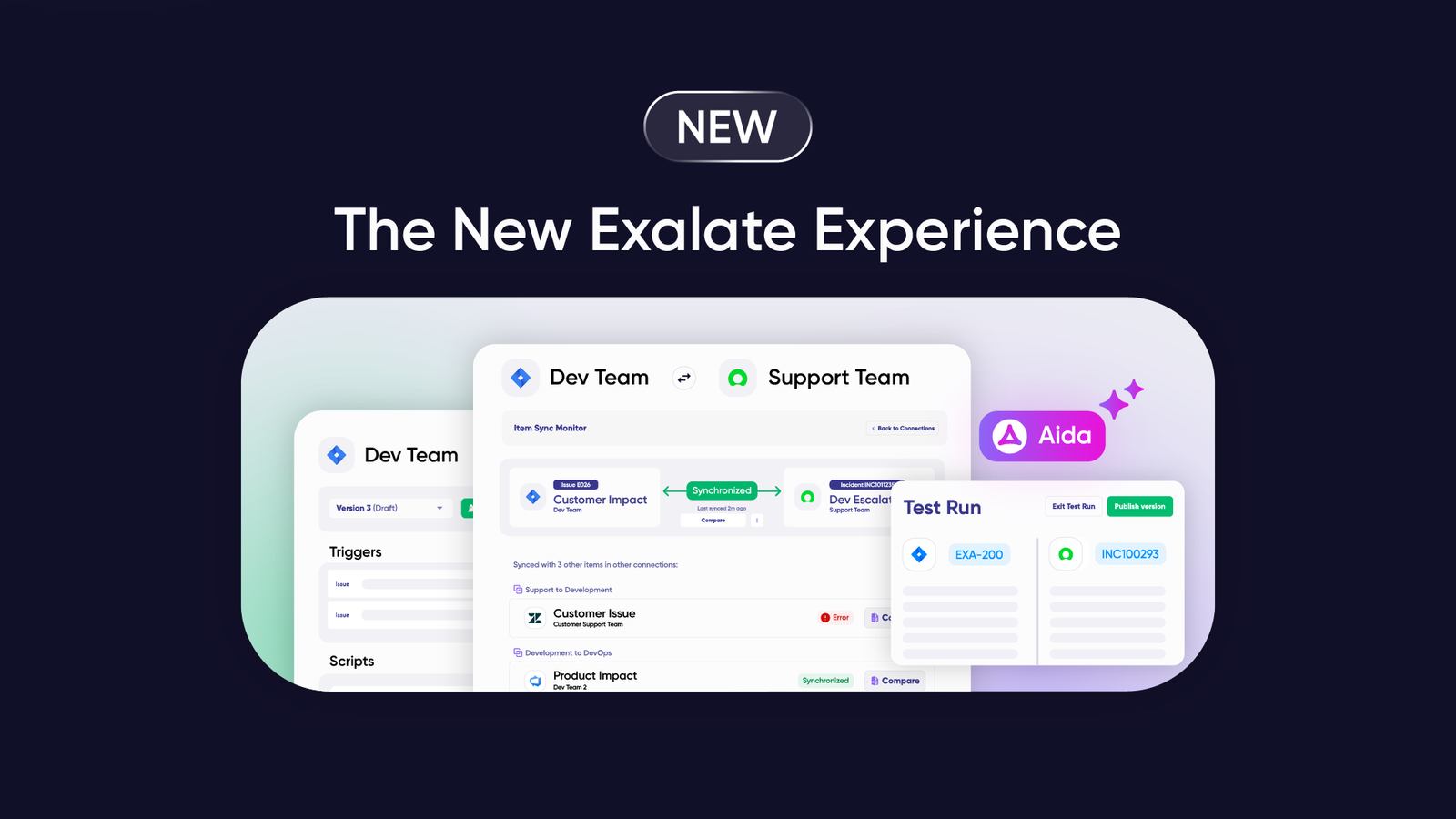

Teams working with Jira Service Management and ServiceNow often need to bridge the gap between these powerful platforms. Since both systems aren’t directly compatible, organizations typically implement integration solutions to enable seamless collaboration.
Most teams opt for third-party integration platforms, though companies with substantial resources occasionally build custom solutions from scratch.
This guide covers everything you need to know about integrating ServiceNow with Jira Service Management, including practical use cases, implementation strategies, and real-world applications using Exalate.
Note: Jira now refers to issues as work items.
Key Takeaways
- Jira Service Management and ServiceNow integration enables unified service delivery across ITSM and DevOps teams without requiring dual licensing or manual data transfers.
- Exalate provides bidirectional real-time synchronization of incidents, problems, change requests, work items, SLA data, and custom fields using AI-assisted configuration.
- Integration supports complex enterprise scenarios, including multi-instance connections, MSP workflows, M&A situations, and cross-platform collaboration between development and support teams.
- Aida and AI-assisted configuration accelerate setup time while maintaining flexibility through customizable sync rules for unique business requirements.
- Enterprise-grade security, role-based access control, and end-to-end encryption ensure compliance and data protection across integrations.
- Platform supports 10+ primary use cases, including SLA synchronization, time tracking, priority escalation, knowledge management, security incident handling, and multi-entity mapping.

Jira Service Management vs. ServiceNow: Understanding Platform Strengths
Jira Service Management (JSM) is Atlassian’s ITSM solution that extends Jira’s capabilities for customer and internal service request management. Teams already using Jira Cloud or Server instances can seamlessly add JSM to handle service delivery workflows.
ServiceNow operates as a standalone enterprise service management platform, purpose-built for automating service delivery workflows and providing comprehensive ITSM capabilities at enterprise scale.
When to Use Each Platform
Jira Service Management excels for:
- Internal IT support and low-to-medium volume external support
- Teams already embedded in the Atlassian ecosystem
- Agile development teams needing integrated project and service management
- Organizations prioritizing cost-effective ITSM solutions
ServiceNow works best for:
- Enterprise-scale service desk operations
- Complex ITSM workflows requiring extensive customization
- Organizations managing multiple service domains (IT, HR, facilities)
- Companies requiring advanced enterprise service management capabilities
Data Format Considerations
ServiceNow uses HTML as its default data format, while Jira Service Management converts data to Wiki or Markdown. This formatting difference requires transformation during synchronization, which integration platforms like Exalate handle automatically through built-in converters.
Why Integrate Jira Service Management with ServiceNow?
Unify Service Delivery Across Platforms
Connecting JSM and ServiceNow consolidates data between teams and organizations, ensuring everyone works with synchronized information. Teams gain a unified view for faster reporting and access to critical operational data across both platforms.
Increase Productivity and Visibility
When JSM and ServiceNow instances sync bidirectionally, collaboration becomes seamless. Teams involved in the synchronization maintain clear visibility into all data updates in real time. A global logistics company streamlined collaboration between call center and support teams, reducing ticket resolution time by 40%.
Improve Service Quality and Response Times
Unified data visibility enables both teams to deliver ITSM and DevOps responsibilities with higher accuracy and faster resolution rates. NVISO, a cybersecurity company, gained a competitive advantage through improved cross-team collaboration and incident response.
Reduce Licensing and Infrastructure Costs
Teams with existing Jira subscriptions can continue using Service Management without purchasing ServiceNow licenses for development teams. Similarly, ServiceNow teams avoid onboarding new Jira instances. Both organizations save significantly on licensing costs, infrastructure, and training investments.
Enable Complex Enterprise Scenarios
Integration supports multi-instance configurations, MSP client management, merger and acquisition transitions, and cross-organizational workflows that would otherwise require expensive custom development or manual processes.

Calculate time and money savings from automated bidirectional sync.
Jira Service Management to ServiceNow Integration Use Cases
Understanding practical applications helps teams recognize integration value. Here are detailed business and technical use cases demonstrating real-world implementations.
Case 1: Transfer SLA Details from ServiceNow Incident to Jira Work Item
Challenge: Customer-created ServiceNow incidents contain critical SLA information that development teams need for prioritization and deadline management. Without synchronization, developers work without understanding time constraints.
Solution: Configure Exalate to sync SLA information from ServiceNow incidents to user-defined fields in Jira work items. Include SLA name, incident state, breach time, and remaining duration.
Real-World Application: When ServiceNow agents create tasks with SLA commitments, Jira administrators automatically receive comprehensive SLA summaries in attached work items. Development teams prioritize work based on actual breach timelines rather than subjective urgency assessments.
if(firstSync){

  issue.projectKey = "SD"

  issue.typeName = nodeHelper.getIssueType(replica.type?.name, issue.projectKey)?.name ?: "Task"

}

issue.customFields."SLA Info".value = ""

for(int i=0; i<replica.slaResults?.size; i++){

  issue.customFields."SLA Info".value += "Name: ${replica.slaResults[i].name} \n Breach Time: ${replica.slaResults[i].breach_time} \n State: ${replica.slaResults[i].stage} \n\n"

}Code language: JavaScript (javascript)
Case 2: Synchronize Time-Related Data Between Jira and ServiceNow
Challenge: Organizations struggle to understand the actual time and financial investment in resolving operational incidents. ServiceNow tracks incidents but lacks detailed development time tracking capabilities.
Solution: When ServiceNow incidents escalate to Jira, they appear as Epics that break down into stories with time estimates and actual time spent. This provides complete visibility into the development effort required for incident resolution.
Real-World Application: Operations teams create incidents in ServiceNow. Development teams receive corresponding Epics in Jira, create child stories for investigation, fixes, testing, and deployment. All time tracking syncs back to ServiceNow, enabling accurate cost analysis and capacity planning.
Case 3: Use Automation to Convey Priority
Challenge: High-priority work items in JSM require immediate attention from external support teams using ServiceNow, but manual escalation introduces delays and inconsistencies.
Solution: Implement automated priority and urgency synchronization with custom mapping rules. Critical priorities in one platform automatically translate to corresponding urgency levels in the other.
Real-World Application: When JSM work items escalate to “Highest” priority, they automatically create “1 – Critical” incidents in ServiceNow. External support teams receive immediate notifications through ServiceNow’s escalation mechanisms.
def priorityMapping = [

  // ServiceNow incident priority <-> Jira work item priority

  "1 – Critical": "Highest",

  "2 – High": "High",

  "3 – Moderate": "Medium",

  "4 – Low": "Low",

  "5 – Planning": "Lowest"

]

def defaultPriority = "Low"

def priorityName = priorityMapping[replica.priority?.name] ?: defaultPriority

issue.priority = nodeHelper.getPriority(priorityName)Code language: JavaScript (javascript)
Case 4: Streamline Mergers and Acquisitions
Challenge: After mergers or acquisitions, one company uses JSM while the other uses ServiceNow. Both teams need to collaborate without abandoning their established systems and workflows.
Solution: Exalate enables continued operation in respective systems while maintaining bidirectional synchronization. Teams collaborate seamlessly during transition periods without forcing immediate platform consolidation.
Real-World Application: Acquiring companies connect their ServiceNow instance with acquired company’s JSM environment. Customer support tickets, development work items, and change requests sync bidirectionally. Over time, organizations can migrate at their own pace while maintaining operational continuity.
Case 5: Share Detailed Information with Partners
Challenge: External partners, suppliers, vendors, and MSPs need specific information about service requests without access to internal systems containing sensitive data.
Solution: Sync stories, scrum tasks, epics, change requests, and problems selectively to provide relevant details while maintaining security boundaries.
Real-World Application: Software vendors track customer-reported defects in Jira while clients manage service requests in ServiceNow. When clients report incidents, corresponding work items appear in vendor Jira instances with complete context. Resolution updates sync back to the client ServiceNow environments automatically.
Supported entities include:
View complete lists of supported entities and fields for Jira and ServiceNow.
Case 6: Improve Self-Service and Knowledge Management
Challenge: Users raise requests via ServiceNow portals, but knowledge base content, automation rules, and AI-assisted routing exist in JSM. Without integration, organizations duplicate efforts or sacrifice automation capabilities.
Solution: Sync requests bidirectionally so JSM’s backend processes—auto-triage, routing, and AI-assisted configuration—process ServiceNow-initiated requests. Resolution notes and knowledge articles sync back for user visibility.
Real-World Application: Customers submit requests through ServiceNow self-service portals. Requests automatically appear in JSM, where AI-assisted configuration suggests solutions based on historical patterns. When resolved, knowledge articles or resolution notes sync back to ServiceNow, enriching the knowledge base for future self-service resolution.
Case 7: Map ServiceNow Customer Case to Jira Epic
Challenge: Organizations need detailed mapping frameworks transferring complete ServiceNow case content to corresponding Jira Epics, including all fields, relationships, and hierarchical structures.
Solution: Establish comprehensive field mapping that converts ServiceNow customer cases to Jira Epics and underlying problems to stories, maintaining complete data fidelity and relationships.
Real-World Application: Customer support teams manage cases in ServiceNow with multiple related problems. When cases meet escalation criteria, they automatically create Jira Epics. Each underlying problem becomes a story under the Epic, preserving hierarchical relationships and enabling development teams to work within their native environment.
Case 8: Multi-Instance MSP Client Management
Challenge: Managed Service Providers manage dozens of client Jira instances while operating a central ServiceNow environment for service delivery. Each client requires isolated data visibility while MSPs need unified operations.
Solution: Exalate connects multiple client JSM instances to a single ServiceNow instance with granular access controls. Each client’s work items sync to dedicated ServiceNow assignment groups, maintaining data isolation while enabling centralized operations.
Real-World Application: MSPs create client-specific connections with customized field mappings. When Client A logs a work item in their JSM portal, it appears only in their designated ServiceNow assignment group. MSP technicians work in ServiceNow while clients maintain visibility in their native JSM environment. Client data never crosses organizational boundaries.
Essential Features for JSM-ServiceNow Integration Solutions
When evaluating integration platforms for connecting Jira Service Management with ServiceNow, consider these critical capabilities:
Bidirectional Real-Time Synchronization
The integration must support two-way, near-real-time data flow. Changes in either platform should reflect in the other within seconds, not minutes or hours. Look for solutions that sync work items, comments, attachments, status updates, and custom fields bidirectionally without manual intervention.
Flexible Field Mapping and Transformation
Every organization has unique workflows and custom fields. Integration platforms should support unlimited custom field mappings, data transformations (HTML to Markdown conversions), and conditional logic for complex mapping scenarios. Exalate’s Groovy-based scripting provides this flexibility while AI-assisted configuration simplifies implementation.
Multi-Entity Support
Beyond basic incident synchronization, robust integrations sync problems, change requests, catalog tasks, RITM (Request Item), customer cases, stories, and epics. Verify the solution supports all ServiceNow and JSM entities your organization uses, including custom tables and fields.
AI-Assisted Configuration
Modern integration platforms incorporate AI assistance for script generation, configuration recommendations, and troubleshooting. Exalate’s Aida assistant accelerates setup by generating sync scripts based on natural language descriptions of requirements, reducing implementation time from weeks to hours.
Granular Trigger Control
Sophisticated trigger mechanisms determine which work items synchronize based on assignment groups, priorities, labels, custom field values, or complex query logic. This prevents data overload and ensures only relevant information syncs, reducing noise and improving team focus.
Enterprise Security and Compliance
For regulated industries, integration platforms must provide ISO 27001 certification, role-based access control, end-to-end encryption, and comprehensive security documentation. Verify the vendor maintains current security certifications and provides transparency through trust centers.
Multi-Instance Support
Organizations with multiple JSM or ServiceNow instances require solutions that handle many-to-many connections. This capability is essential for MSPs, enterprises with regional deployments, or companies with separate development and production environments.
Operational Control and Customization
Teams need full control over synchronization logic without vendor dependencies. Script-based solutions like Exalate provide operational autonomy, allowing teams to customize sync behavior, implement complex business rules, and adapt to changing requirements without waiting for vendor updates.
Comprehensive Support and Documentation
Evaluate vendor support quality, documentation depth, and community resources. Look for solutions with searchable documentation, code examples, video tutorials, and responsive support teams. Exalate provides Premier and Standard support tiers with dedicated integration engineers available for complex implementations.
Performance and Scalability
High-volume environments require integration solutions that handle thousands of daily synchronizations without performance degradation. Verify the platform’s architectural approach supports your current and future transaction volumes, with clear performance metrics and scaling capabilities.
How Exalate Handles ServiceNow to Jira Service Management Integration
This tutorial demonstrates how to integrate Jira and ServiceNow using Exalate.
Go to the Exalate app. If you already have an account, you can log in directly.
New users can create an account by manually entering their email and verifying it, or by signing up using Google.
Creating a Workspace
Workspaces help you organize and manage your integrations and connections in a single place. You can find all your existing workspaces under the “Workspaces” tab.
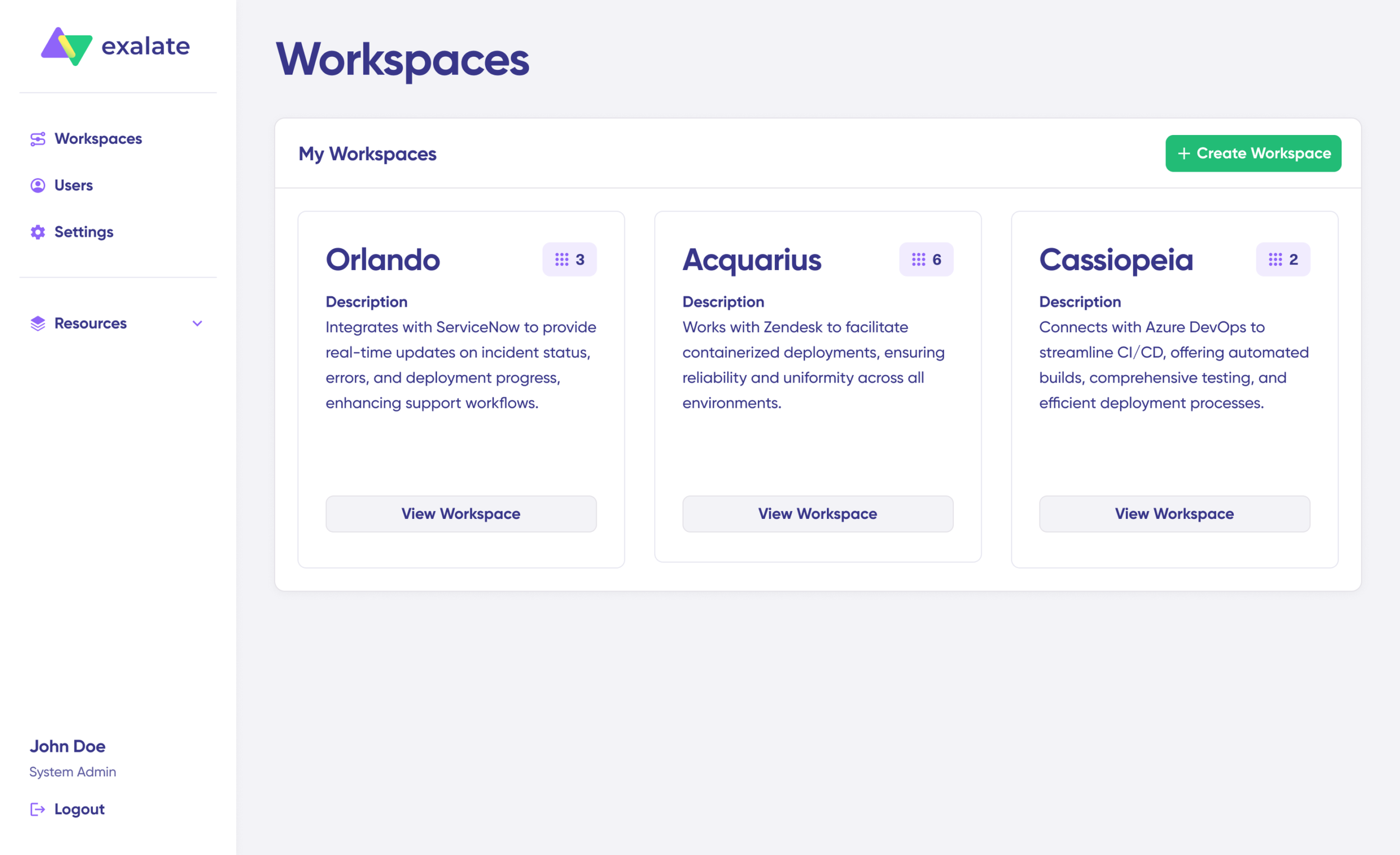
To create your first workspace:
- Click the “+ Create Workspace” button.
- Enter a name and description for your workspace.
- Click “Create workspace” to confirm.
Creating Your First Connection
Once you have a workspace, you can start creating connections between Jira and ServiceNow. If you already have an existing workspace, you can view all your connections under the “Connections” tab, where you can edit connection settings and view other connection details.
Note: To create a connection, you’ll need an active Exalate account with at least one workspace and the access credentials for the systems you want to connect.
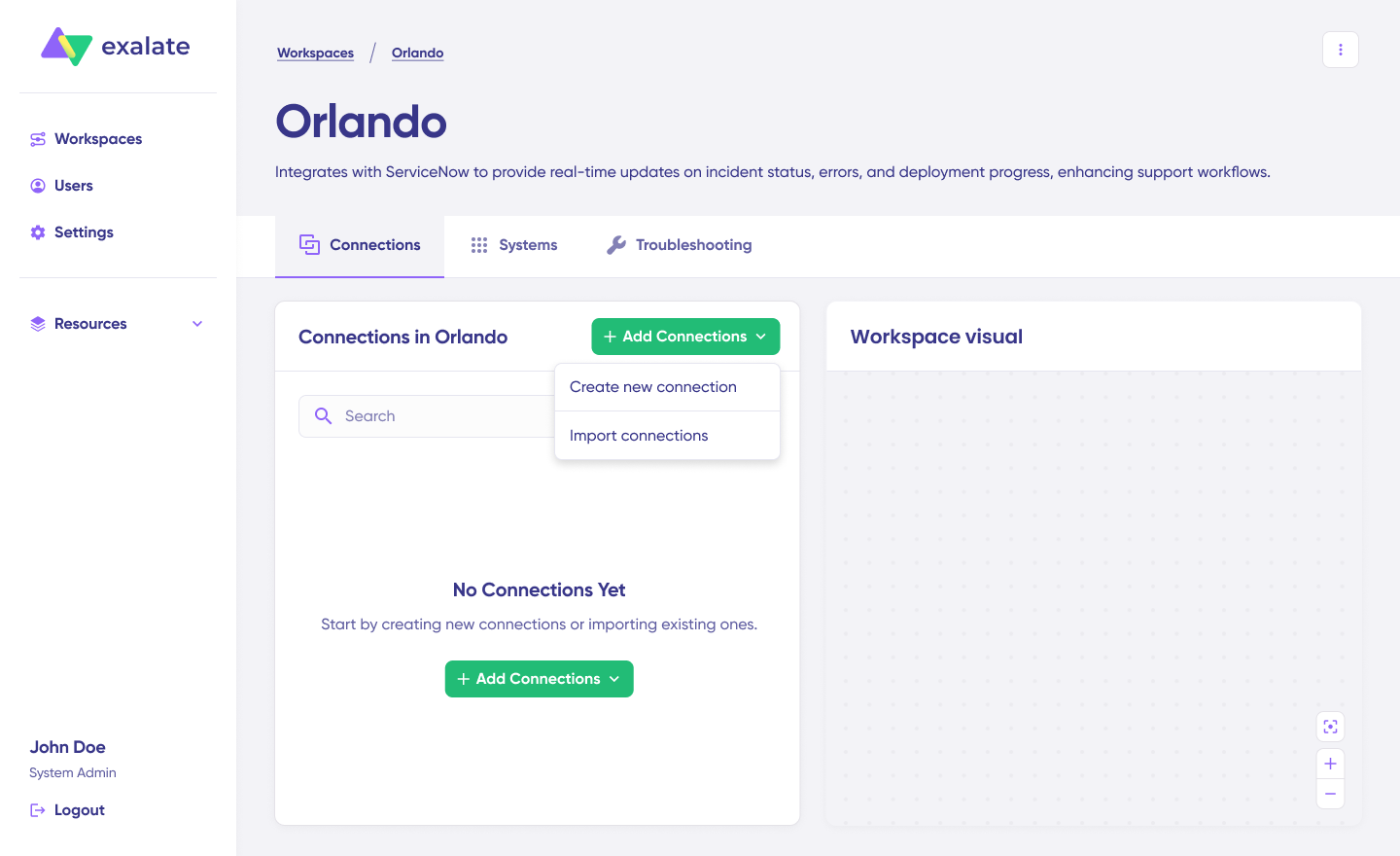
Jira ServiceNow Connection Setup Steps
- Click “+ Add connections” > “Create new connection”.
- Enter the name for your first system (System A). You can name either Jira or ServiceNow as System A—it doesn’t matter which one goes first.

- Enter the URL of your system. For example, if you start with ServiceNow, enter your ServiceNow instance URL.

- Once you enter the URL, a validation check occurs. If your system is already part of the existing workspace, authentication happens automatically. If the system is part of a different workspace, it will be imported into your current workspace.
- For new systems, you’ll need to enter your authentication details. ServiceNow uses Basic authentication, and Jira uses OAuth.
- Complete the same setup process for the Jira side.
- Give your connection a name and description.

- Click “Next”.
- Review the details to ensure they are correct, then click “Create connection”.
When the process is complete, select “Continue to configuration” and choose a Jira project you want to use for synchronization.
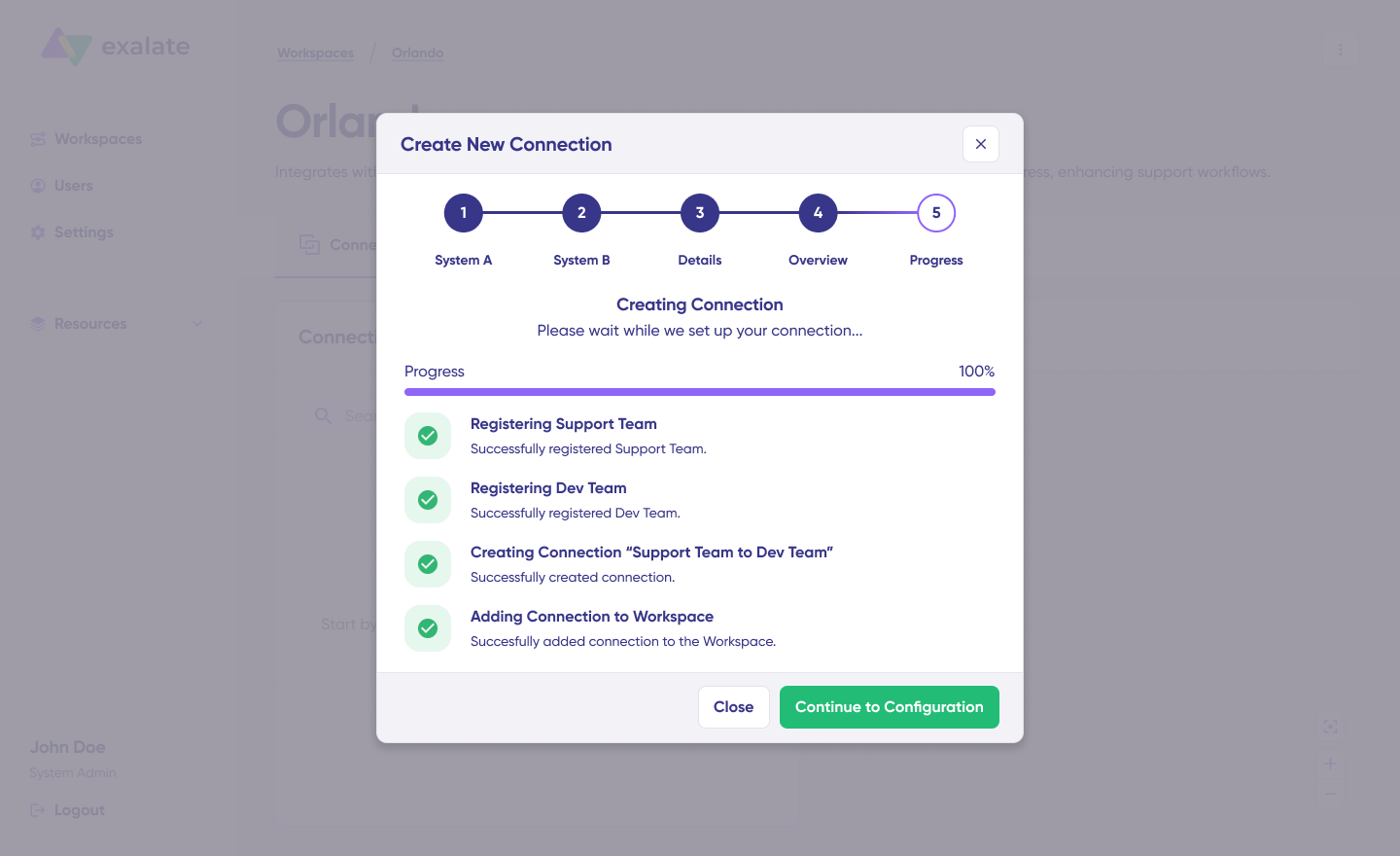
Then click “Build & continue”.
Jira ServiceNow Configuration Options
After creating your connection, you have two configuration options: “Quick Sync” and “Edit & Test”.
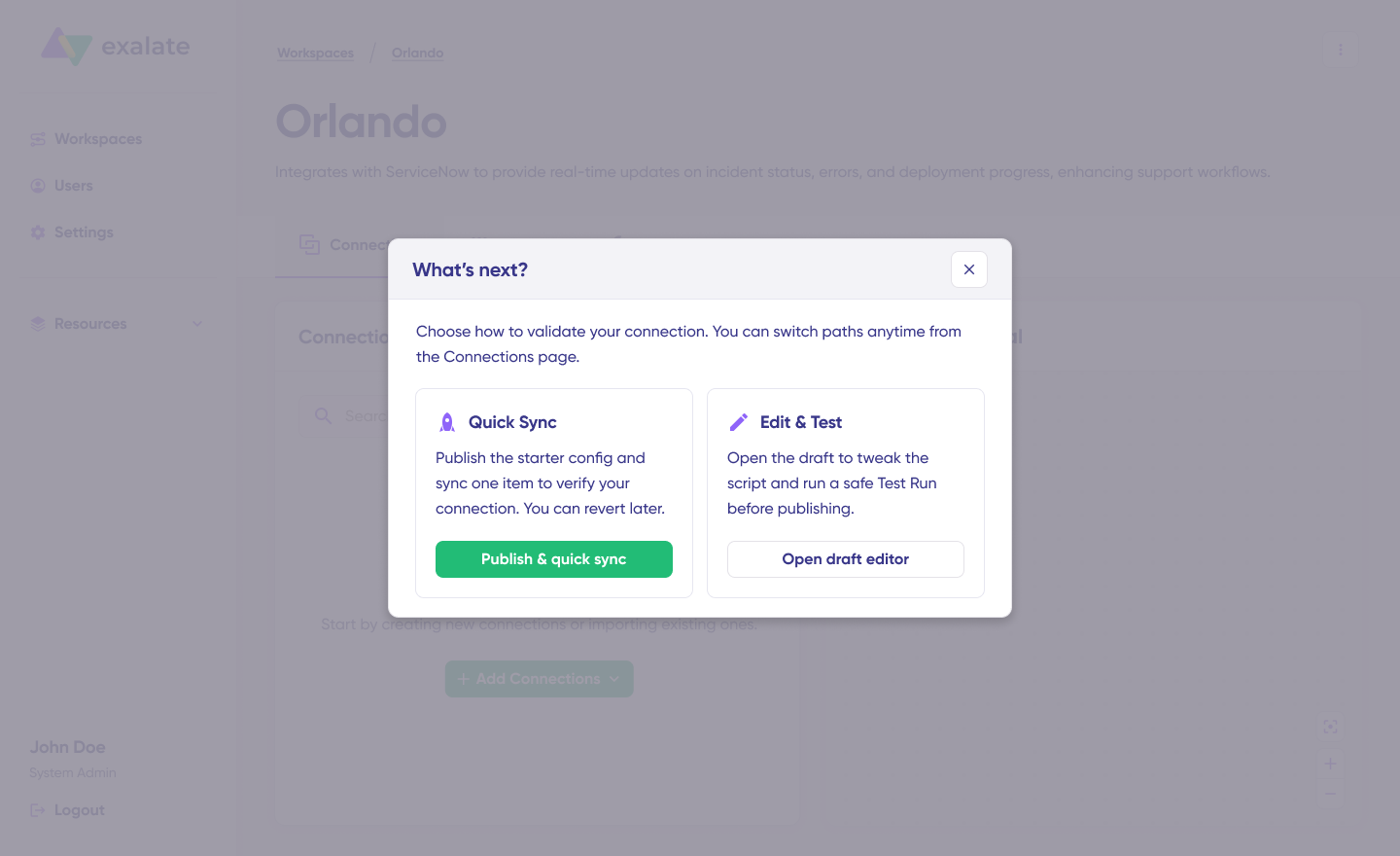
Let’s explore both.
Quick Sync: Publish & Quick Sync
This option allows you to sync one item between Jira and ServiceNow to verify that your connection works properly. This is an optional step, but recommended for initial testing.
Under the “Item sync monitor,” enter the work item key in Jira or the incident number in ServiceNow.
To sync the first item, click “Sync Now”. To link two existing items, click “Link with existing”.
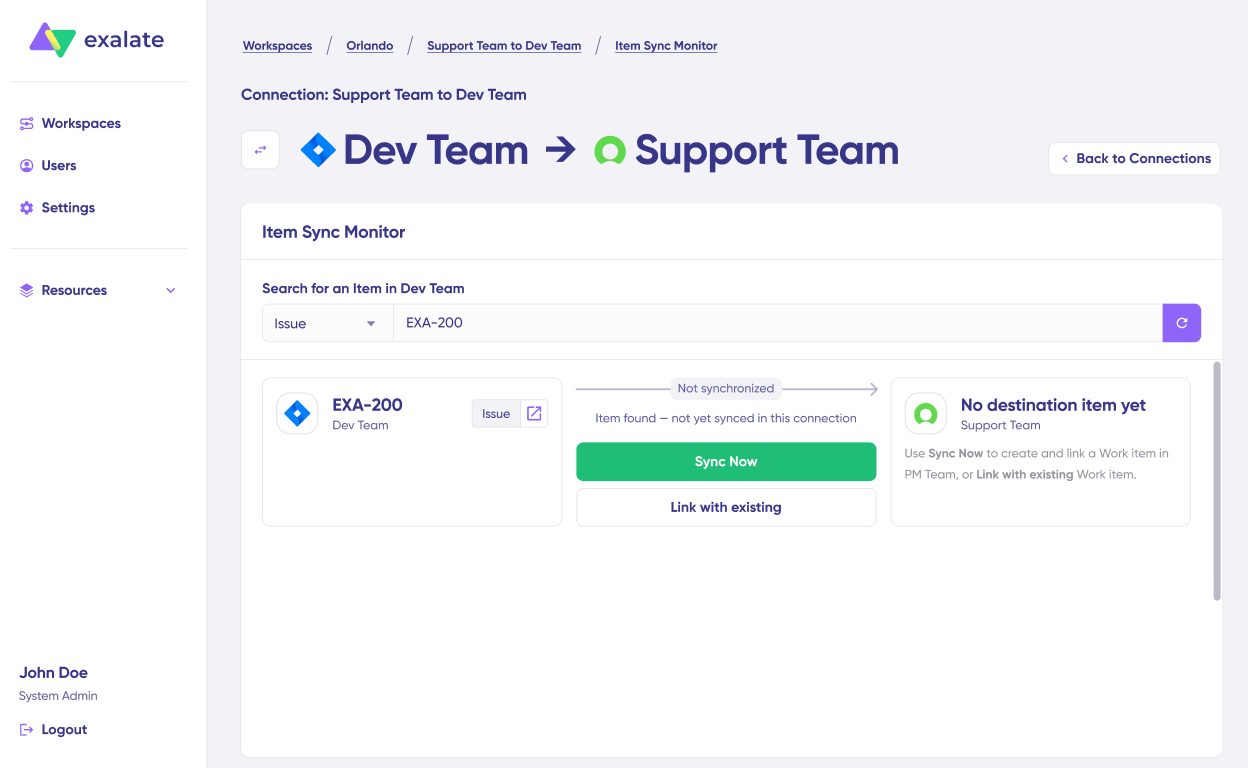
You’ll receive status updates while the items sync, and once the sync is complete, you can view both synced issues by opening them in a new window.

You can also compare how the synced items will look and how the changes will be applied.
Edit & Test: Open Draft Editor
To start making changes to your sync configuration, click “Create a new version” or select “Open latest draft”.
This ensures you don’t accidentally modify the existing configuration. Changes in the draft are saved automatically.
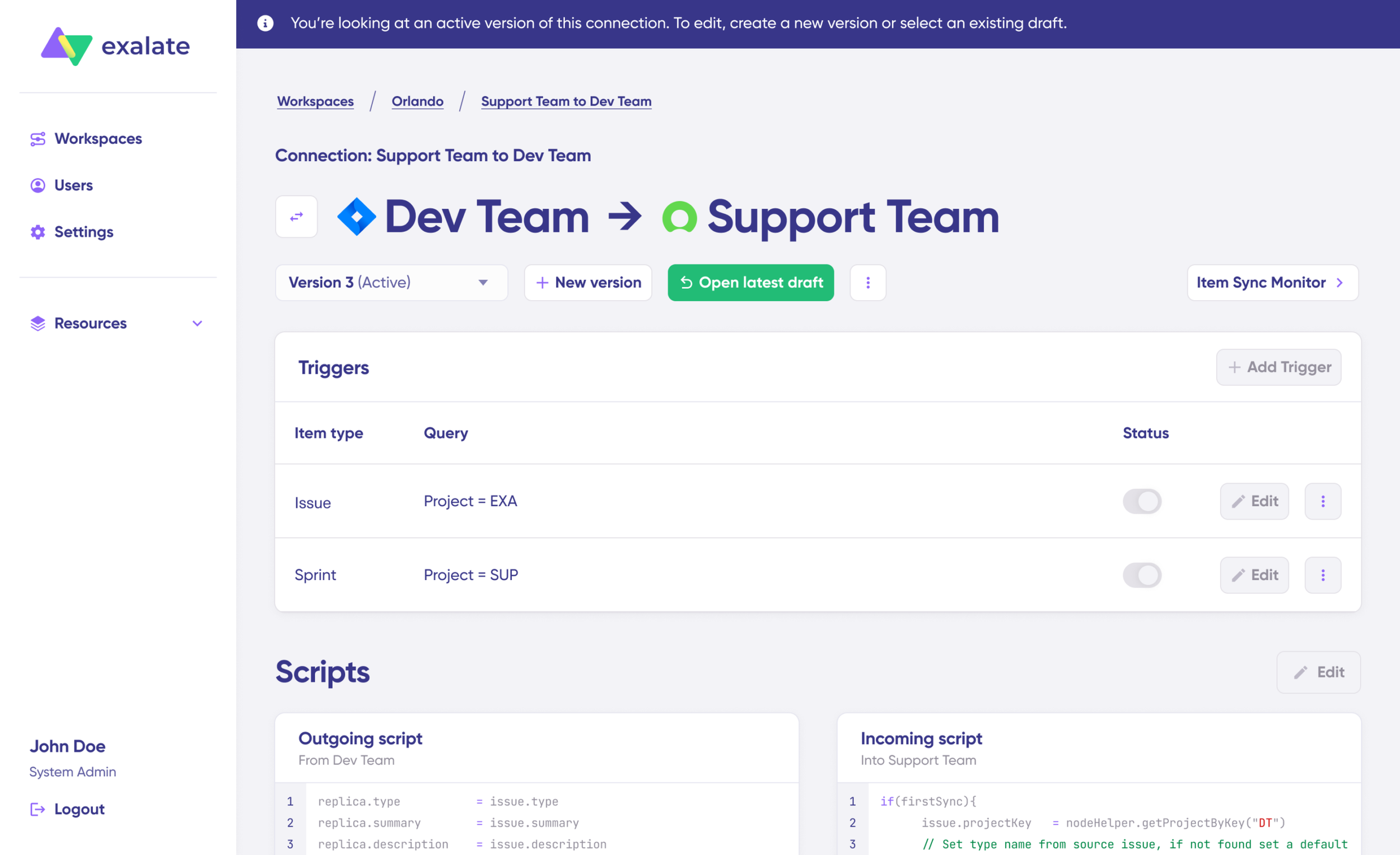
Click the “Edit” button to open the editor and modify the sync rules.
Understanding Sync Rules
Sync rules are based on Groovy scripts. With these scripts, you can add custom data logic and mapping, along with conditional flows, allowing you to adapt for any complex or advanced use cases and workflows.
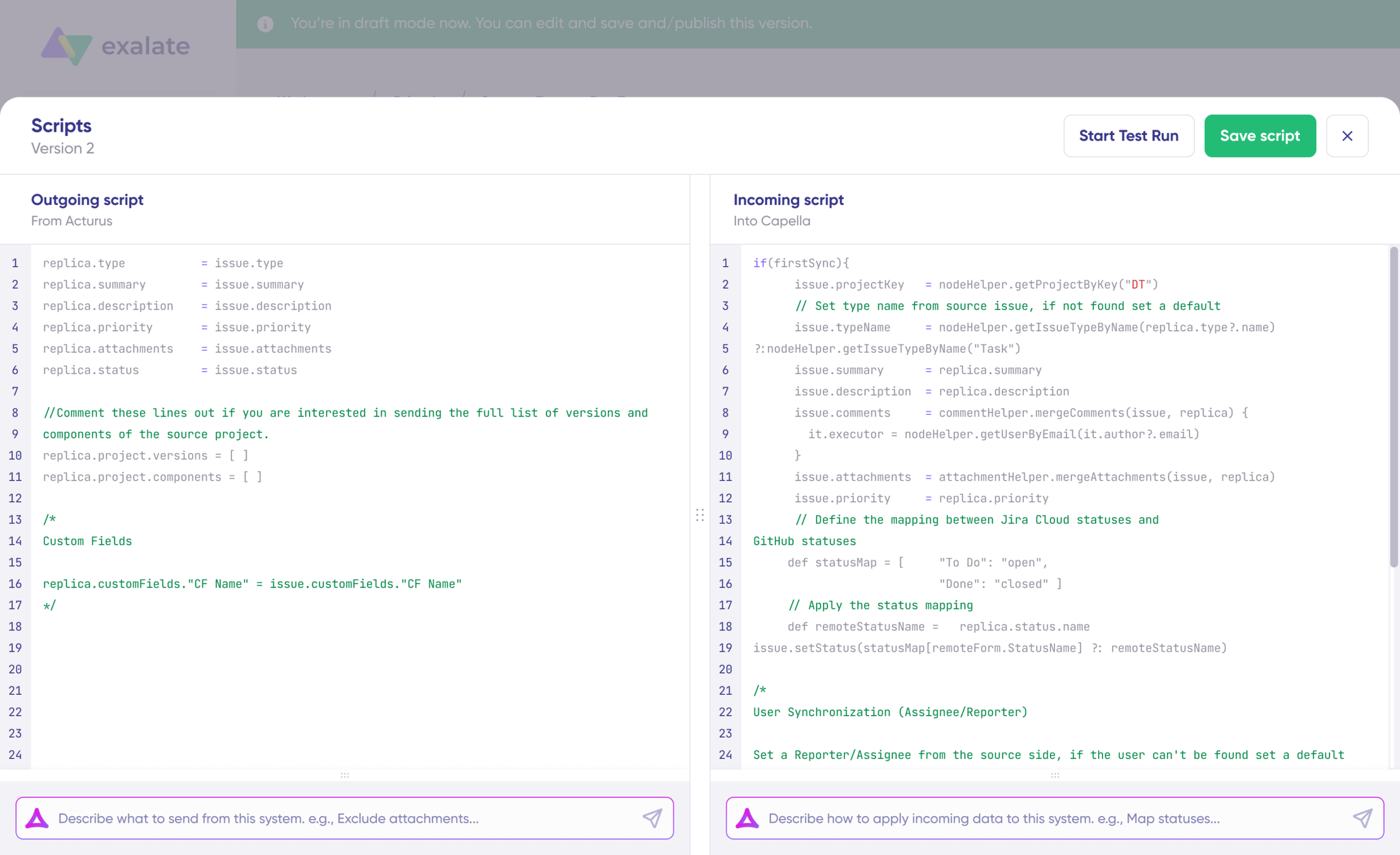
The direction of the sync can be changed by clicking the two arrows next to the connection name.
The scripts are divided into incoming and outgoing scripts:
- Outgoing script: If the sync direction is from Jira to ServiceNow, the outgoing script will hold the values passed from Jira to ServiceNow.
- Incoming script: The incoming script defines how the values coming from Jira are mapped in ServiceNow.
These scripts will be reversed if the direction changes.
Replica works like a message payload and holds the actual data passed between the synced entities. It exists in JSON format.
To sync new values, you can enter the sync script yourself if you are familiar with Groovy.
To stop something from syncing (for instance, attachments from Jira to ServiceNow), simply remove that script line from the corresponding script.
AI-Assisted Configuration
To save time and simplify the scripting process, you can use Exalate’s AI-assisted configuration feature called Aida to generate sync scripts.
Aida is available in both incoming and outgoing script sections, so choose the appropriate side accordingly.
Aida helps you in two ways:
- For Outgoing scripts: Describe what data should leave your system. For example, “Exclude attachments” or “Only sync high-priority issues.”
- For Incoming scripts: Describe how incoming data should be applied to your system. For example, “Map statuses” or “Set a default assignee if the user can’t be found.”
Based on Exalate’s scripting API and your existing scripts, Aida generates working Groovy scripts with proper field mappings for you.
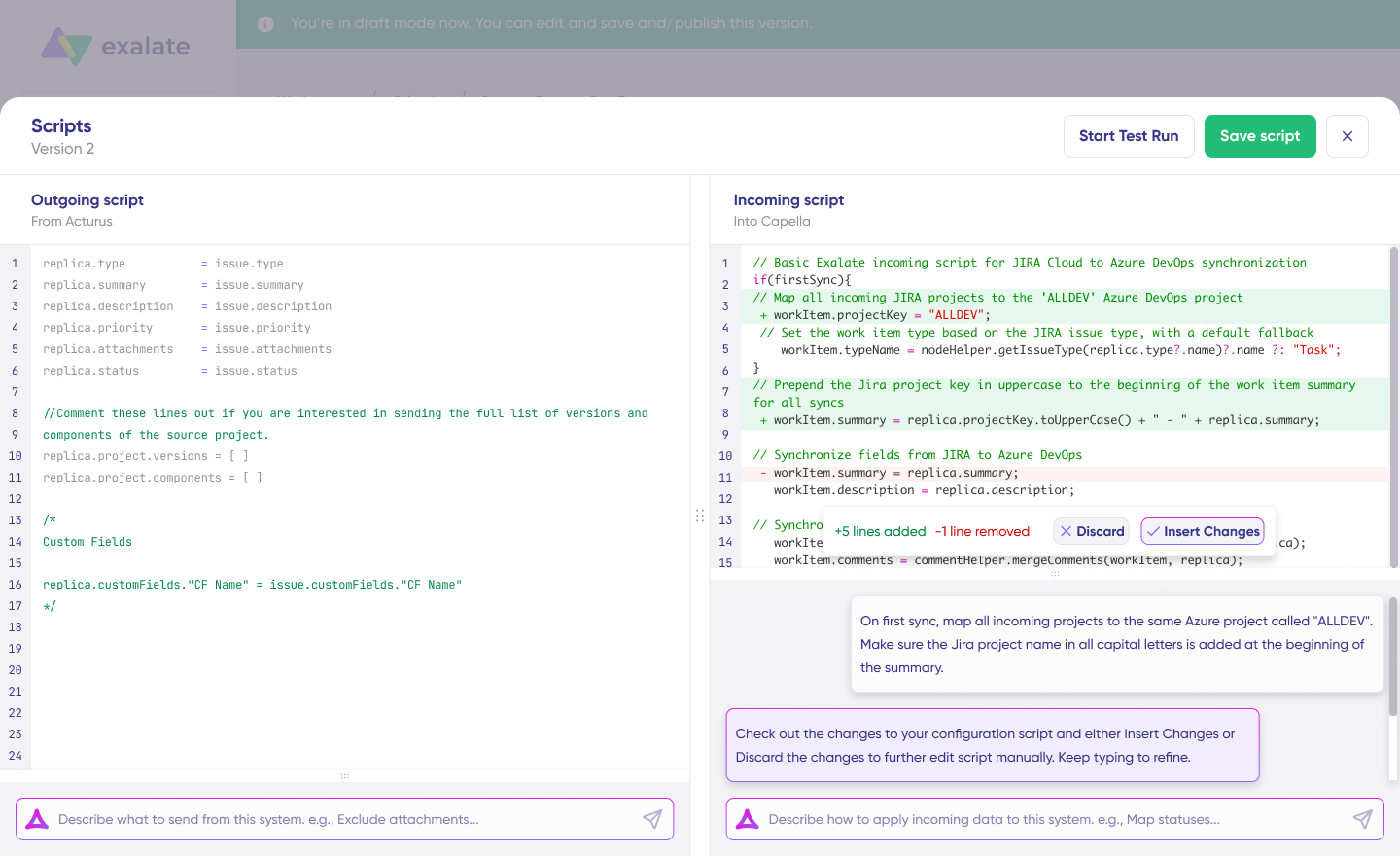
Once Aida finishes drafting your script, review the suggested changes. Green highlights indicate new lines that will be added, while red highlights show lines that will be removed from your script. You can choose to “Insert” or “Discard” Aida’s suggestions.
The outgoing and incoming scripts work independently, as does Aida, so maintain separate context and direction for each prompt.
Note: While Aida is helpful, like any AI tool, please review the generated code before applying it.
TestRun: Validate Before Production
Once your sync scripts are ready, you can choose to “Save script” or proceed to test them using the “Start Test Run” option.
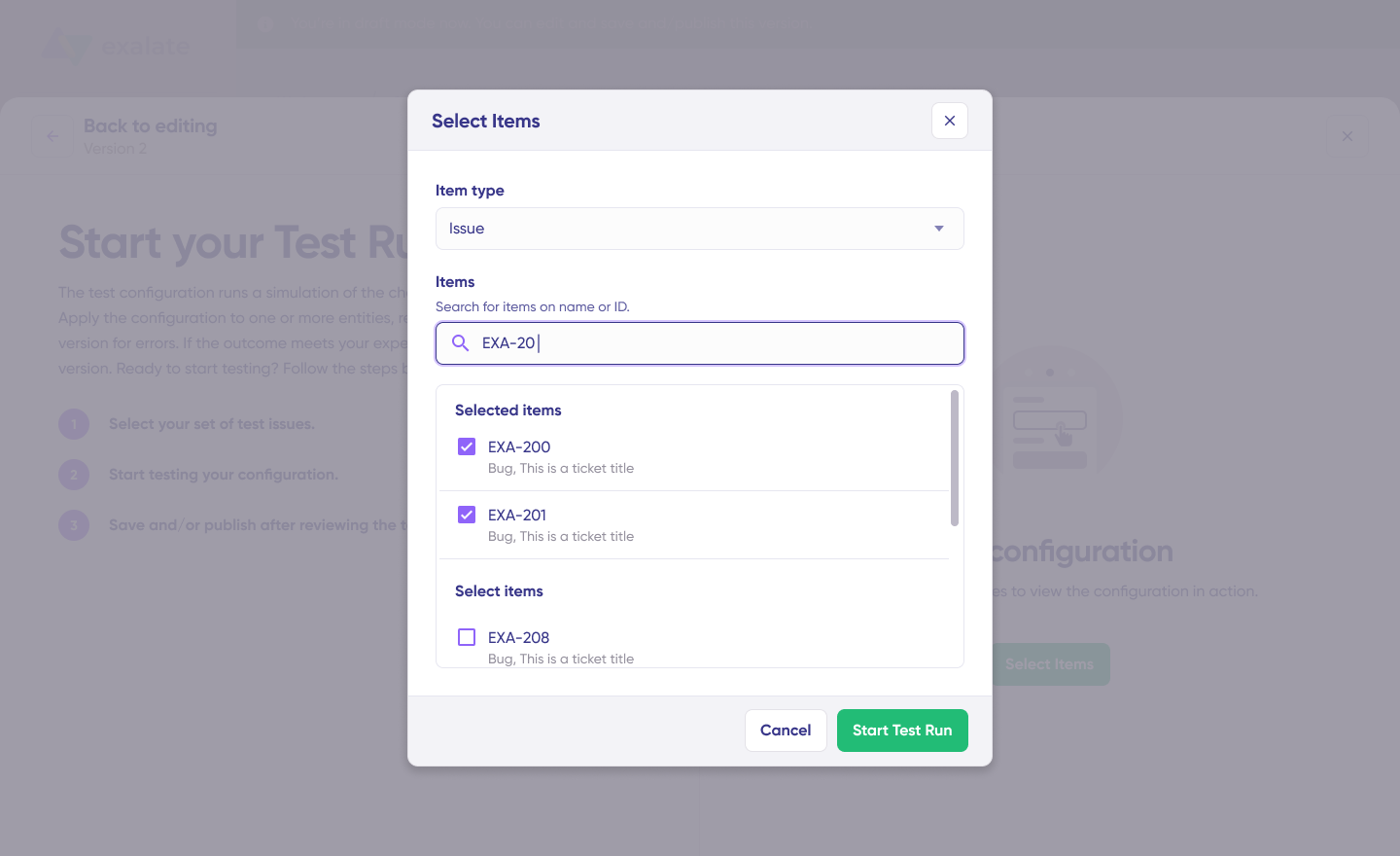
To test the configuration, select the items you want to apply the sync to. You can select multiple items. Once selected, click “Start Test Run”. You can now view all the incoming and outgoing replicas for each item you selected in their respective tabs.

Review how the sync configuration will be applied to your items, preview the replica, and verify that the field mappings look correct. If needed, go back, adjust the scripts, and test again. Deploy only when you’re confident everything works correctly.
This safety net prevents errors from affecting live data.
Once everything matches your needs, click “Publish Version” to apply the updated configuration to your live synchronization.
All versions for a connection are available in the “Version” dropdown. Versions can be either “Active”, in “Draft” (editable), or “Archived”.
Adding Triggers
To start your sync automatically, it’s important to add triggers, which are conditions or filters you apply to specific items. For instance, you can sync all Jira work items that have a label “dev”, or sync all incidents in ServiceNow that belong to a specific assignment group.
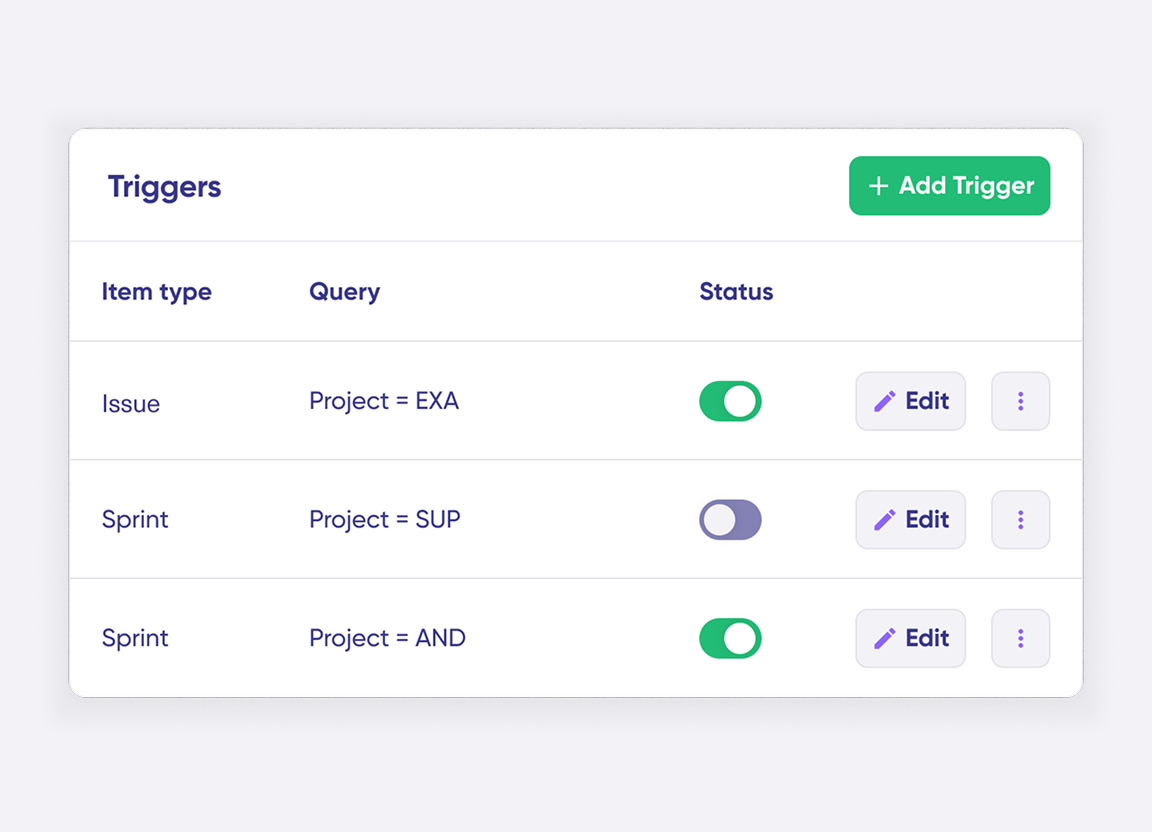
Click the “+ Add trigger” button to start creating triggers. These triggers are platform-specific:
- For Jira: You can use Jira Query Language (JQL) to specify conditions for work items or sprints.
- For ServiceNow: You can use the advanced search syntax to apply the trigger to incidents, problems, change requests, etc.
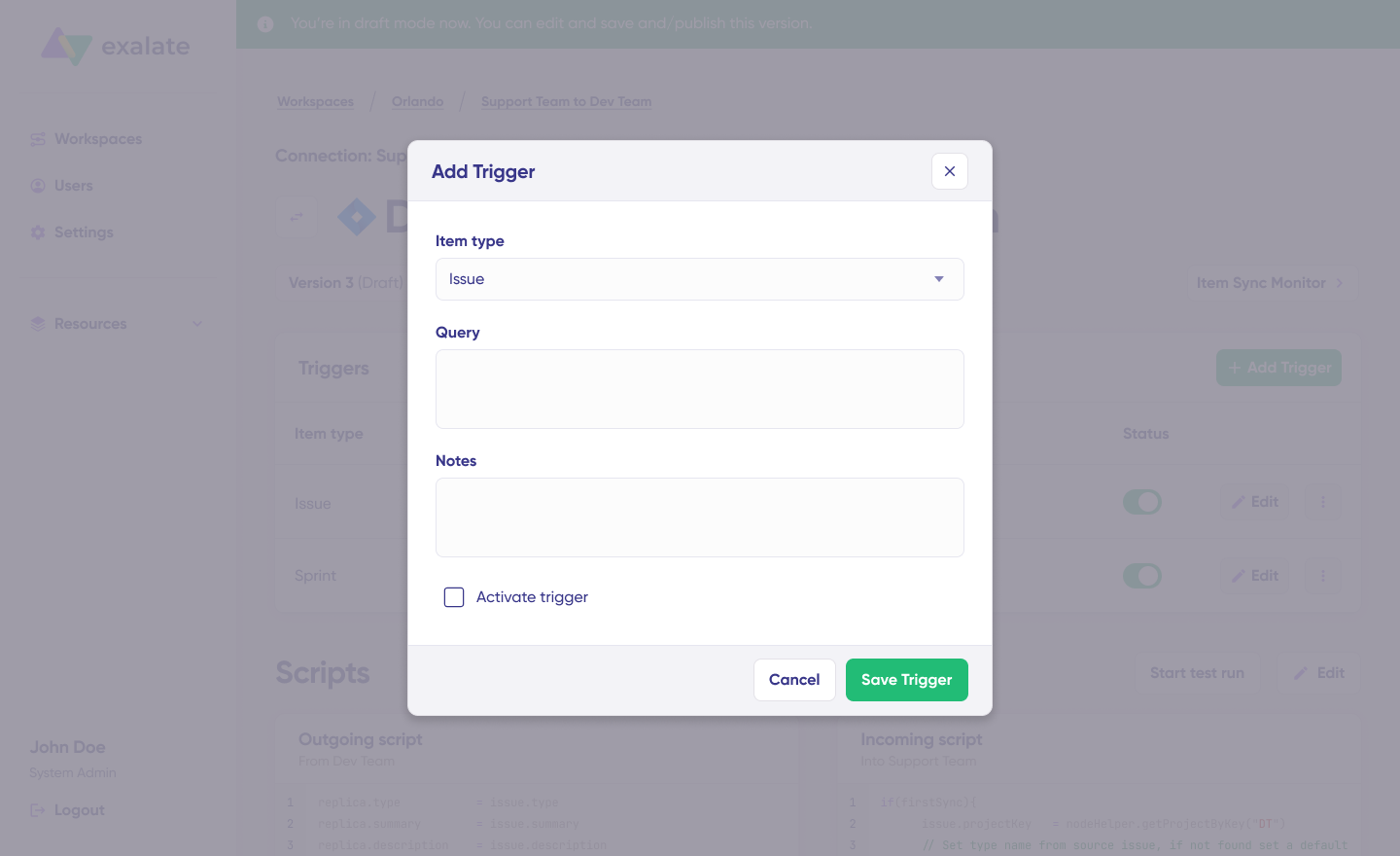
Save your changes by publishing them.
Deploy and Monitor
That’s it! Your first synchronization will start automatically based on the sync rules and triggers you have set. Happy syncing!
Unfortunately, troubleshooting errors is a significant part of synchronization, especially in script-based tools like Exalate, which allow the flexibility of setting up complex workflows.
Troubleshooting with Aida
Aida AI helps you troubleshoot errors faster by offering clear and context-aware suggestions to resolve errors right where you see them.
If there’s an error, go to the “Troubleshooting” tab of your workspace. Hover over the error you want to diagnose and click on the Aida icon that appears next to the error. You will see the AI-generated suggestion in the modal window. This includes a short explanation of the error and a proposed solution for it.
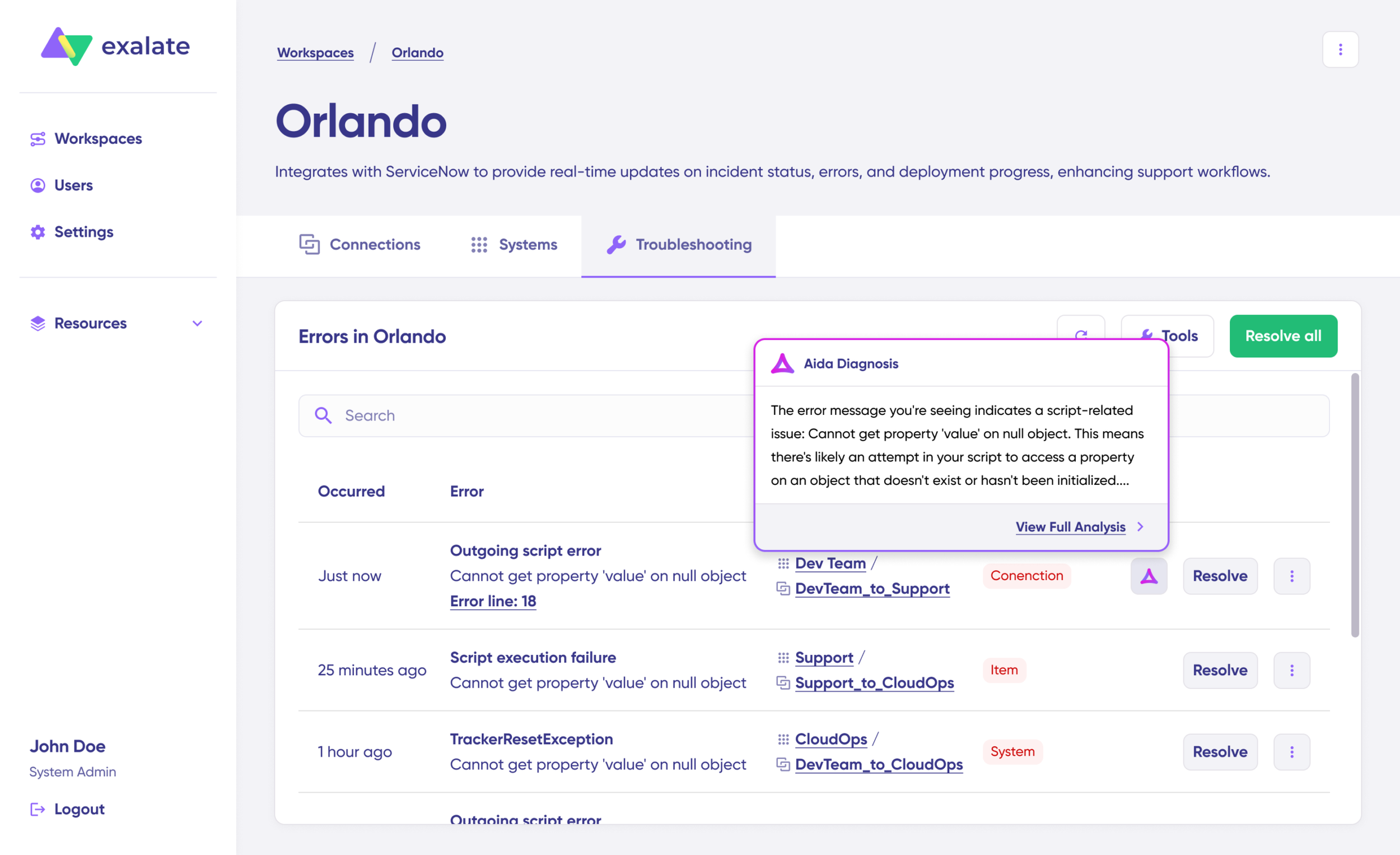
You can also “View Full Analysis” to get more context.
Additionally, you can view “Error details” to copy the stack trace and “Replicas” to view the JSON format, if required.
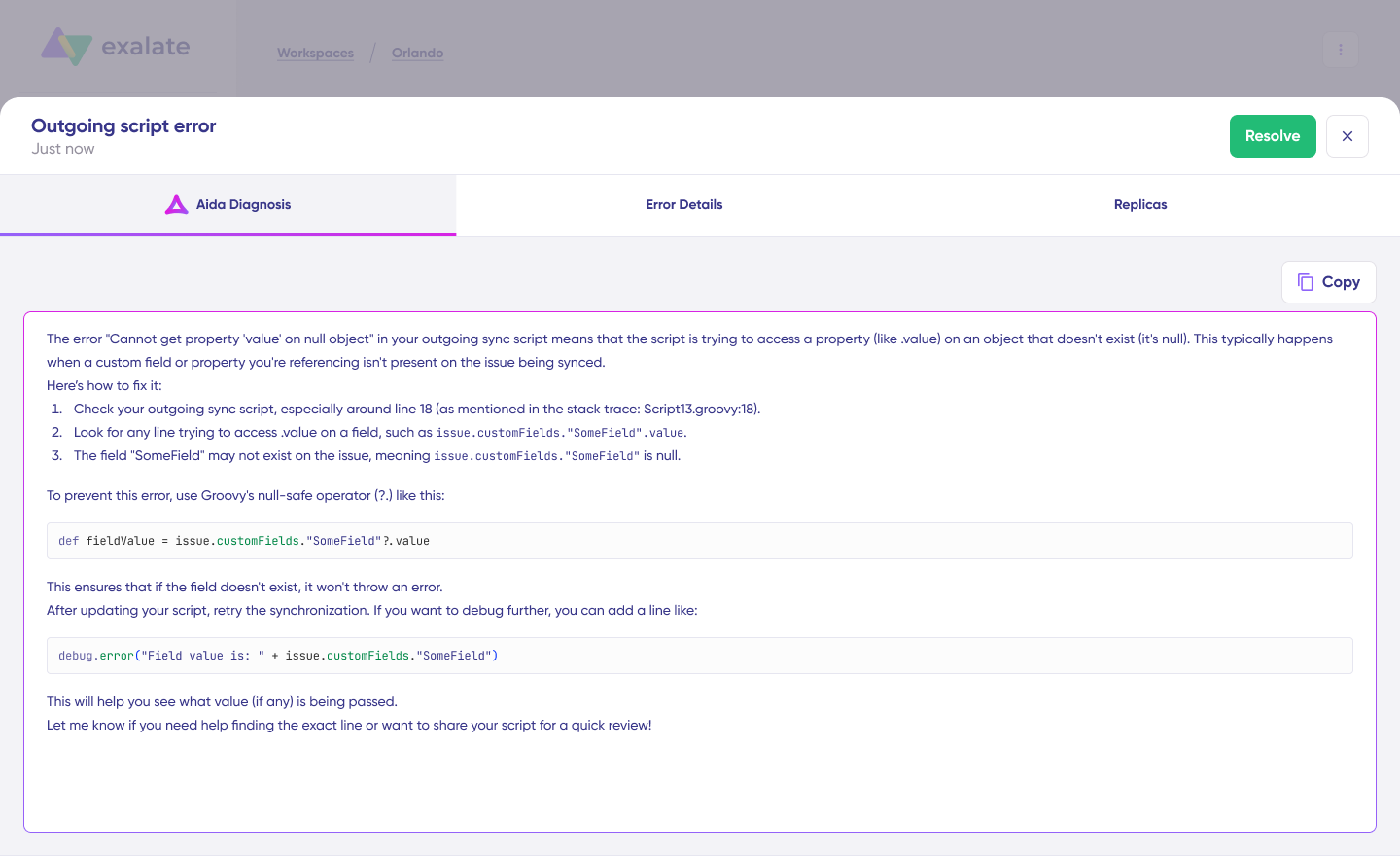
Choose to “Resolve” and retry errors as needed.
Start Integrating JSM and ServiceNow Today
Connecting Jira Service Management with ServiceNow transforms how development and operations teams collaborate, eliminates manual data transfers, and ensures both platforms maintain synchronized, accurate information.
Exalate provides the flexibility, security, and scalability enterprises need for complex integration scenarios while maintaining ease of use for straightforward implementations.
Ready to unify your service delivery? Start a free 30-day trial with full access to Exalate’s advanced features, AI-assisted configuration, and Premier support.
Frequently Asked Questions
What is the difference between native ServiceNow integration and third-party solutions?
Atlassian’s native ServiceNow integration focuses primarily on sending incidents from ServiceNow to JSM as alerts and forwarding JSM alerts back to ServiceNow. It’s designed for incident response workflows where ServiceNow triggers alerts that notify JSM teams based on on-call schedules. For full bidirectional work item synchronization with custom field mappings, workflow automation, and deep data transformation capabilities, third-party solutions like Exalate offer comprehensive integration features, including script-based customization and flexible architecture.
Is the integration bidirectional?
Yes, Exalate supports full two-way synchronization, which means changes made in either JSM or ServiceNow automatically reflect in the other platform in near real-time. When an agent updates a work item status, adds comments, or modifies field values in one system, those changes sync to the connected record in the other system. You can also configure one-way sync if your workflow only requires data to flow in a single direction, such as incidents constantly flowing from ServiceNow to Jira without updates syncing back.
What can I sync between JSM and ServiceNow?
With Exalate, you can sync virtually everything: incidents, problems, change requests, catalog tasks, comments (both public and internal work notes), attachments with full file content, descriptions and detailed information, custom fields created by your organization, statuses and workflow states, priorities and urgency levels, SLAs with breach information and timing details, assignees and assignment groups, work notes and activity logs, resolution details and root cause analysis, affected services and configuration items, plus any other fields accessible through ServiceNow’s REST APIs and JSM’s REST APIs using Exalate’s flexible scripting capabilities.
Can I connect multiple instances?
You can connect multiple JSM projects to different ServiceNow instances, one JSM instance to multiple ServiceNow instances, or even complex many-to-many relationships based on your organizational structure. This capability is particularly common for Managed Service Providers managing multiple clients, enterprises with regional ServiceNow deployments, or organizations with separate development and production environments.
How do MSPs use Exalate for this integration?
MSPs typically use Exalate to connect their internal ServiceNow instance with clients’ JSM systems, allowing work item visibility and seamless collaboration without exposing sensitive internal processes, pricing information, or resource allocation details that should remain confidential. When clients log work items in their JSM portal, those items automatically appear in the MSP’s ServiceNow environment, where service delivery teams can work on them. Updates sync back to client systems, maintaining transparency while protecting MSP operational details.
Can I sync custom fields between JSM and ServiceNow?
Yes, Exalate supports unlimited custom field synchronization. Both platforms support extensive customization, and Exalate’s flexible scripting engine allows you to map any custom field created in JSM with any ServiceNow custom field. You can transform data types, apply conditional logic, and implement complex mapping rules using Groovy scripts or Aida AI-assisted configuration.
How do I troubleshoot synchronization errors?
Exalate provides a dedicated Error tab in the console showing all sync failures with detailed error messages, stack traces, and affected records. Common issues include field mapping mismatches, workflow transition restrictions, or permission problems. Aida assistant helps diagnose errors by analyzing error messages and suggesting solutions based on Exalate’s documentation and best practices.
Does Exalate support workflow automation?
Yes, Exalate integrates with both platforms’ automation capabilities. You can trigger JSM automation rules based on ServiceNow incident states or initiate ServiceNow workflows from JSM status transitions. Combine Exalate’s trigger system with each platform’s native automation for powerful automated workflows spanning both systems, creating sophisticated multi-platform business processes.
Recommended Reads: