Key Takeaways
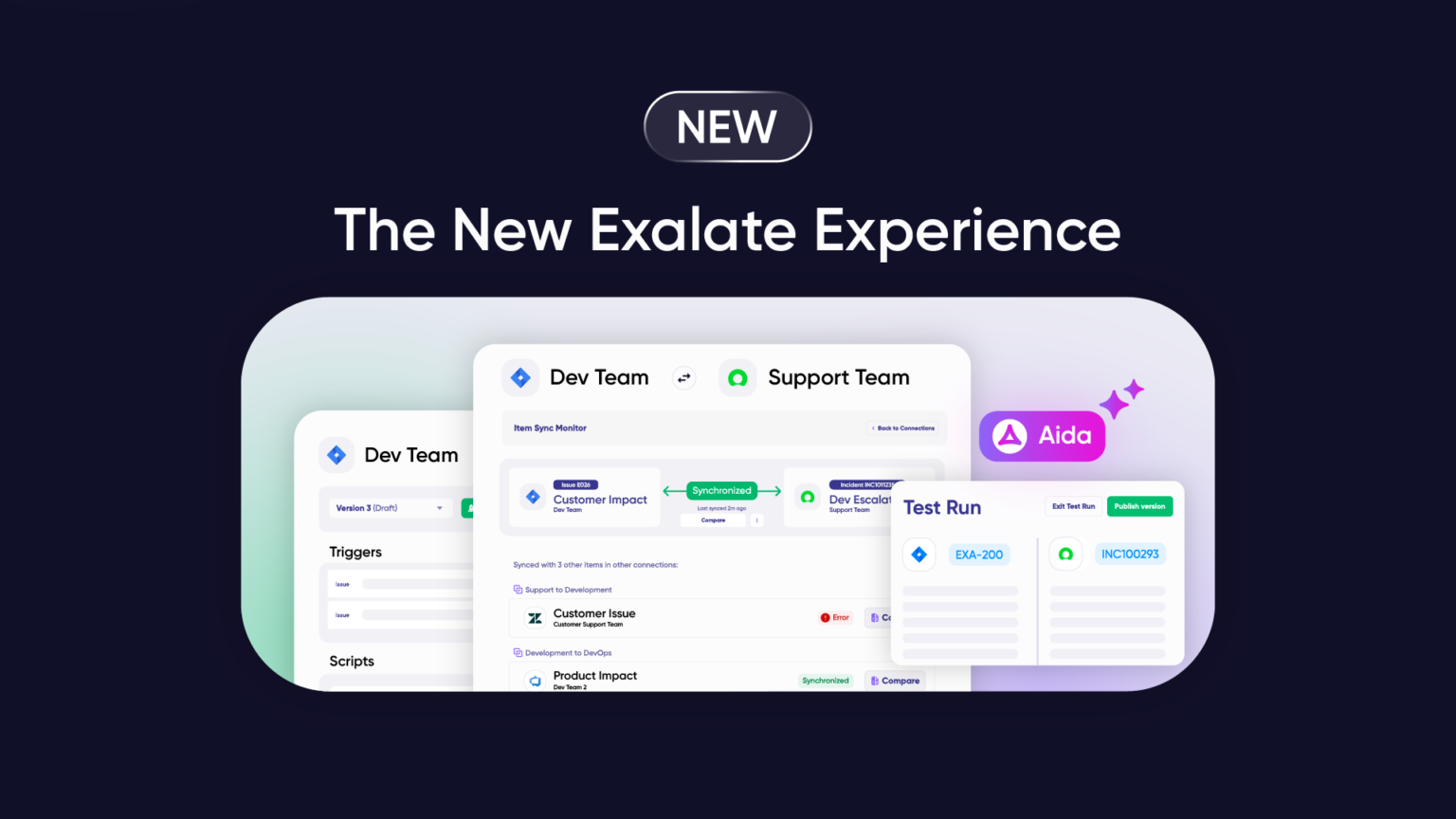
- Exalate has evolved into a new experience that now has a unified console, AI improvements, and features that will change the way your integrations are managed.
- New features include a single console to manage all your connections, Test Run functionality, script versioning, side-by-side connection configuration, and Aida (AI-assisted integration)
- Outcome-based pricing model now charges for active sync pairs instead of user counts. Now, you pay per integration, not for each platform. This subscription model is flexible enough to help you start with a plan that works best for your active items in sync.
- Core scripting engine and operational control remain intact. You still decide what syncs and how
- Groovy-based scripts stay separated by direction (incoming/outgoing) for robust security and control
Your integrations are critical infrastructure. They keep teams aligned, data flowing, and work moving across systems. When something changes at that layer, clarity matters.
This update explains what’s new, what stays the same, and how the Exalate experience is evolving.
| A Note on Naming The existing platform is now referred to as Exalate Classic. Exalate Classic remains fully supported and continues to operate exactly as it does today. The improved experience is referred to as New Exalate. It builds on the same integration engine, with a unified console and improved visibility for managing integrations at scale. |
Why Is Exalate Evolving
When Exalate started, integrations were simpler. A few point-to-point connections between tools. Maybe a handful of sync scenarios.
Integration environments today are larger, more interconnected, and harder to operate.
They have grown into a complex, interconnected ecosystem spanning multiple tools, teams, and companies. Managing dozens (sometimes hundreds) of connections across platforms like Jira, ServiceNow, Azure DevOps, Zendesk, Salesforce, Freshservice, Freshdesk, Asana, and GitHub has become its own challenge, which is separate from the integration logic itself.
The New Exalate experience addresses this reality. It adds visibility and operational control when integration environments scale, without changing what makes Exalate work: highly customizable, real-time bidirectional sync with full scripting control.
What Stays the Same
Let’s start with the important part: what’s not changing:
Your Integrations Keep Running
Every connection you’ve built continues to work exactly as it does today.
Your Scripts Stay Intact
The Groovy-based scripting engine that handles your custom workflows remains there. Every script you’ve written, every custom logic you’ve implemented, all work the same way. Scripts are still divided into incoming and outgoing for each system, so your sync logic remains robust and precise.
Full Operational Control Over Your Sync
You maintain complete control over what data syncs and how. Each side of the integration manages its own rules independently.
Security Standards Remain Strong
Your data stays protected with ISO 27001 certification, encryption in transit and at rest, and role-based access control. Learn more at our Trust Center.
What’s New in the Exalate Experience
The New Exalate experience brings operational improvements that make managing integrations easier, especially as environments grow.
Unified Connection Management Console
Instead of visiting each system individually to check configurations or troubleshoot sync errors, you can now access all your nodes and connections from one place. Think of it as a unified view of your entire integration environment, without changing how any of it actually works.

Side-by-Side Connection View
View script rules, active queues, and errors for both sides of your connection simultaneously from the Connection Details page. Diagnose sync issues without switching between systems.
Test Run Functionality
Test your sync scripts before they touch production data. Create draft configurations, preview what would happen, and only publish when you’re confident everything works as expected. This reduces the risk of errors affecting live items in sync.
Script Versioning & Roll Back
Every time you make a change and publish it, a new version is created.
You can:
- Trace what changed
- See who made the change
- Identify when it changed
- Roll back if something doesn’t work as expected
No more “what did we change last week?” detective work.
Aida: AI-Assisted Configuration & Troubleshooting
Aida initially started off as an expert for all things Exalate in the documentation. Then she started evolving and gained more knowledge about the product, including scripting.
Finally, she found her place inside the product and replaced AI Assist in Exalate Classic. So, now you can interact with Aida inside the product in the same way you did with AI Assist.
Aida not only helps you write scripts for your sync logic but also troubleshoots when something goes wrong.
She provides context-aware suggestions, explains errors in digestible language, and cuts troubleshooting time significantly.
Improved Sync Queue Visibility
Monitor synchronization progress more clearly. Filter by connection name or entity ID, view processing status, and identify work item sync issues faster, especially helpful during bulk operations.
Integration Network Visualization
See all your connections and integrations in one place with a visual representation of how nodes are interconnected in your network. Quickly understand integration architecture and identify dependencies.
New Simpler, Transparent Pricing
We’re making a big change to how we charge for Exalate: you now pay based on how many items you’re actively syncing between your systems. And you can choose a different plan for every new integration you create.
Here’s what that looks like in practice. If you’re syncing 50 work items between Jira and ServiceNow, you pay for only those 50. It doesn’t matter how many times they update, how many users work with them, or how many back-and-forth syncs happen; pay for just the number of items you’re keeping in sync.
This means you can calculate exactly what you’ll pay before you commit. No hidden pricing, no surprise quotes, no guessing. Just straightforward numbers based on your actual use.
You can see what this looks like for your team using our pricing calculator. Pick your integrations, estimate your synced items, and get an instant quote. Or check out the full details on the new pricing model.
Important: What’s Not Available Yet (But Coming Soon)
We believe in being upfront about what’s still in development.
At launch, the New Exalate experience does not include:
Trust Levels for Collaborative Access Control
In Exalate Classic, admins only had access to their own side of the connection. In the new experience, the side-by-side view currently shows both sides to all users.
This is what we call “High Trust” mode, useful for integrations where all parties work closely together.
Granular Trust Levels that restore separated access are coming soon. The underlying sync logic remains separated (incoming and outgoing scripts for each system), so your integration rules stay robust and precise. What’s changing temporarily is who can see what in the console—not how the sync actually works.
Connector Availability
The following connectors are supported at launch:
- Jira Cloud
- ServiceNow
- Azure DevOps Cloud (or Service)
- Azure DevOps Server (on-premises)
- Zendesk
- Salesforce
- Freshservice
- Freshdesk
- Asana
- Early access connectors like Xurrent, Halo ITSM, and more.
- Custom connectors can be requested.
Check the full list of supported integrations here.
Note: GitHub and Jira on-premise are available only in Pro and Enterprise plans. Book a call with our team to learn more.
For complete details about the product roadmap, please visit the product portal.
Security Considerations in New Exalate
Security remains a top priority.
The new Exalate experience maintains:
- ISO 27001 certification: Rigorous security standards
- Encryption: Data is protected both in transit and at rest
- Role-based access control: Granular permissions (coming with Trust Levels)
- Script separation: Incoming and outgoing scripts remain separated for each side
- Audit trail: Script versioning provides a complete change history
- SentinelOne protection: Advanced threat detection and response
For complete security details, visit our Trust Center.
How to Get Started
If You’re an Existing User
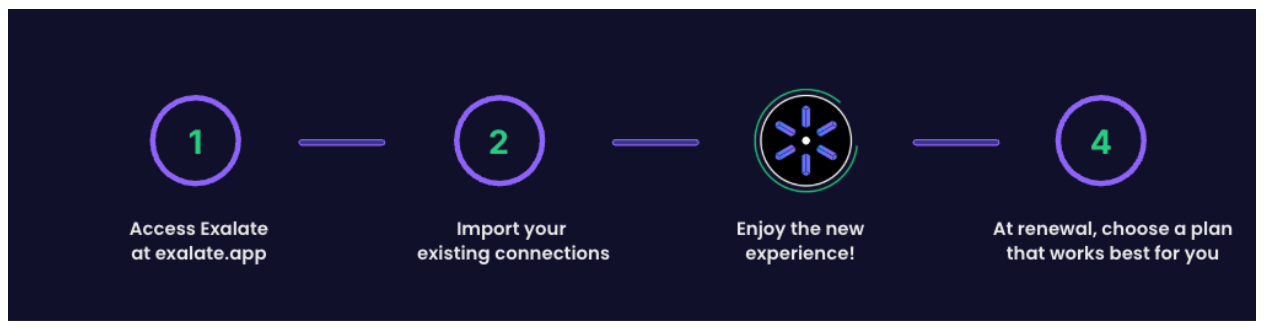
You can explore the New Exalate experience whenever you’re ready. Your Classic integrations keep running. When you want to try the new console, you can import existing connections and switch to the new experience without the need for migration or rebuilding from scratch.
If You’re New to Exalate
You can directly start with the new experience. The New Exalate console offers clearer visibility into your integrations and connections, with safe testing and better change management.
If You’re Evaluating Exalate
The New Exalate experience gives you a clearer view of what you’re building, with safer testing and better change management. The underlying power of real-time bidirectional sync with full scripting control remains the same.
Template-based sync tools (Unito, GetInt) focus on predefined mappings and limited customization. iPaaS solutions (Workato, MuleSoft) prioritize orchestration across systems but add complexity and operational overhead with higher costs at scale.
Exalate is designed for teams that need operational control and high flexibility for advanced cross-team or cross-company scenarios, while keeping the costs predictable.
How To Set Up Your Integration With New Exalate
For this walkthrough, we’ll demonstrate a Jira and ServiceNow integration, one of the most common cross-platform sync scenarios.
Step 1: Create Your Exalate Account
Go to the exalate.app and create your account. Log in if you already have one.
Start by creating your own Workspace.
Workspaces help you organize and manage all your integrations and connections in a single place. Click “+ Create Workspace”, enter a name and description, then click “Create workspace”.
Step 2: Add Your First Connection
Navigate to the “Connections” tab and click “+ Add connections” > “Create new connection”.
Enter details for both systems:
- System A: Enter your Jira instance URL and authenticate (Basic auth with username and password)
- System B: Enter your ServiceNow instance URL and authenticate
Give your connection a name and description, review the details, then click “Create connection”.
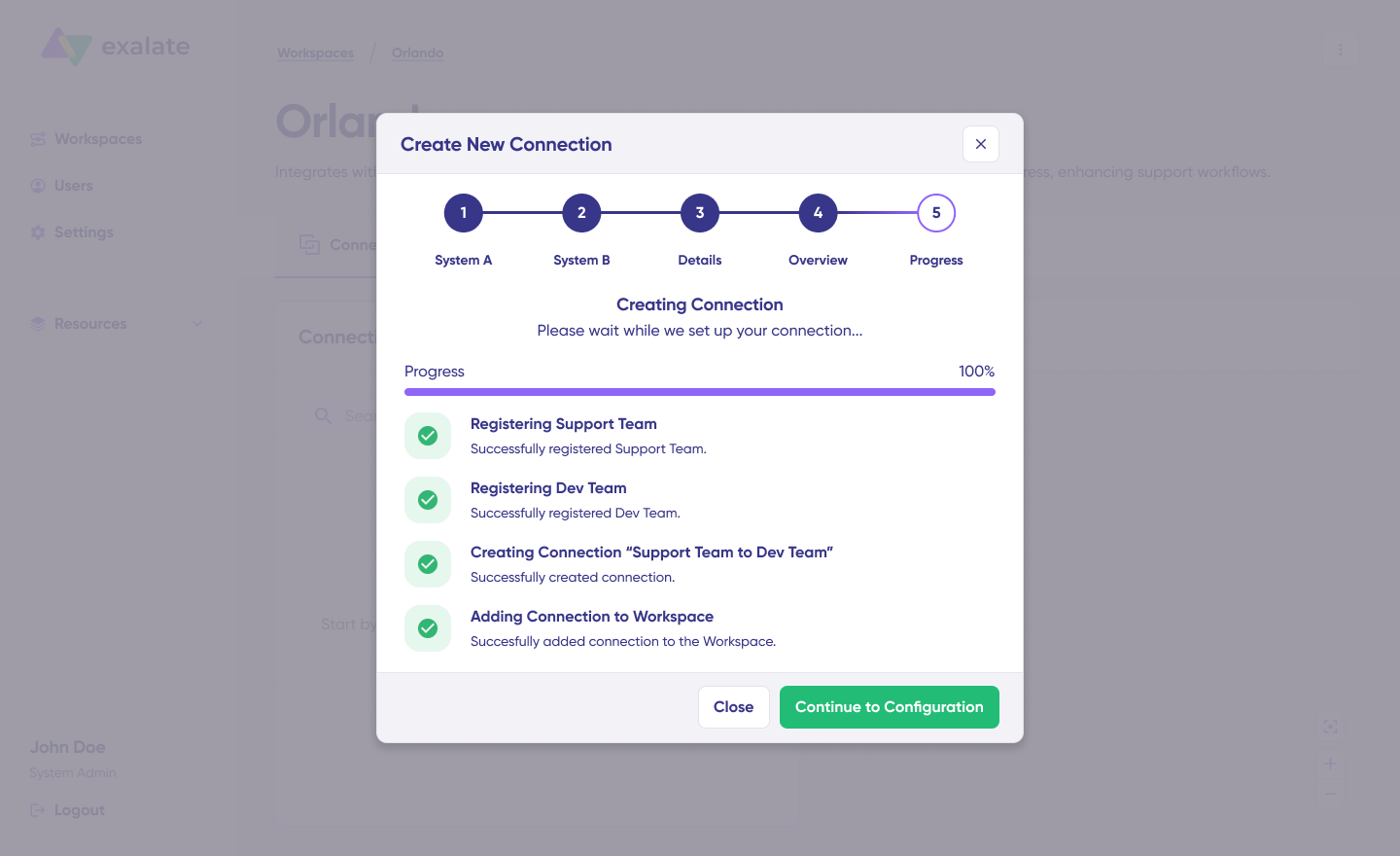
Step 3: Configure Your Sync Rules
After creating the connection, select “Continue to configuration” and choose the Jira project you want to sync.
Click “Build & continue”.
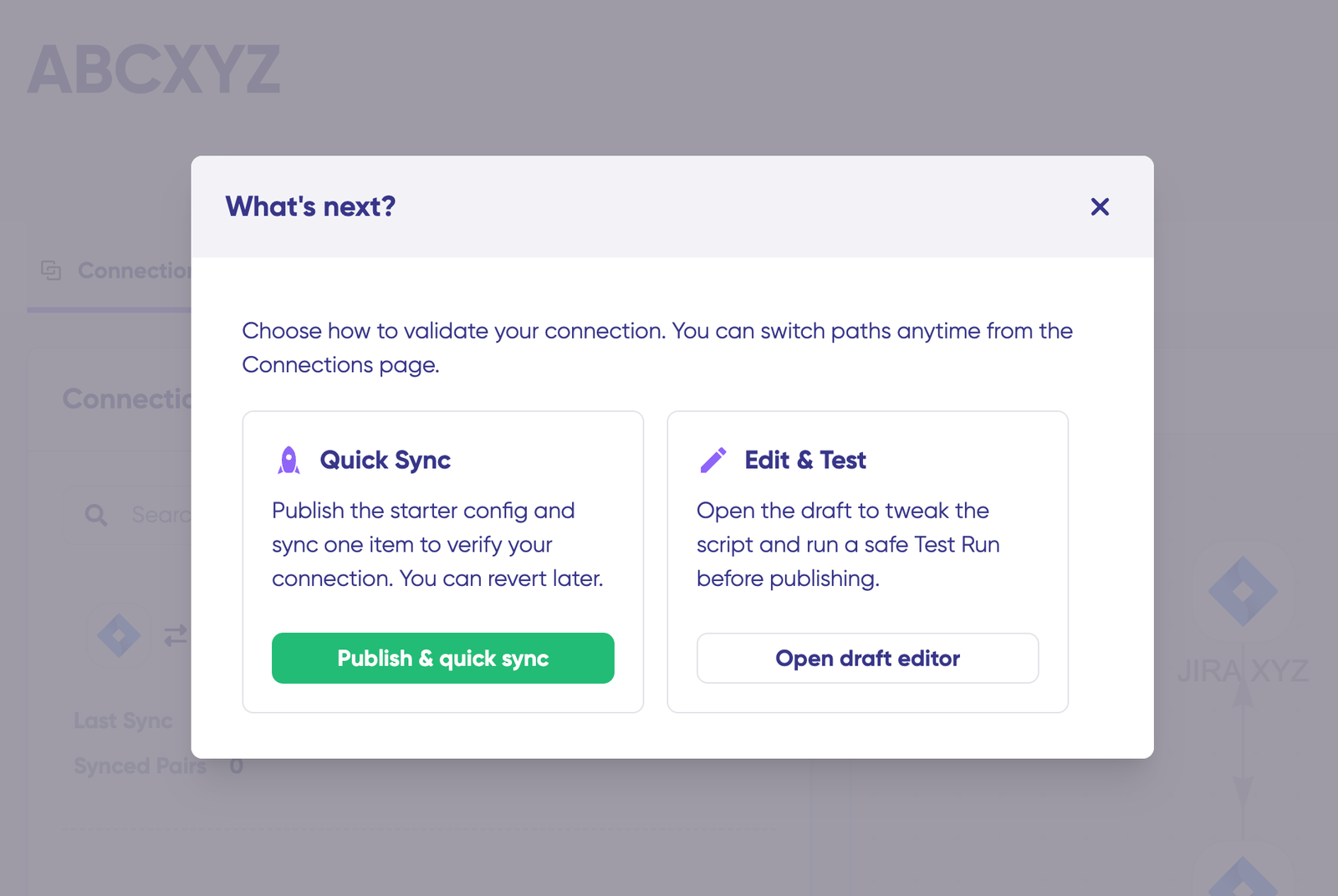
You now have two options:
Quick Sync (Recommended for First-Time Setup)
Sync one work item between Jira and ServiceNow to verify your connection works. Enter a work item key in Jira or an incident number in ServiceNow, then click “Sync Now”. Preview how the synced items look before proceeding.
Edit & Test (For Custom Configuration)
Click “Open latest draft” to start editing sync rules without affecting your live configuration. Changes save automatically.
Step 4: Write or Generate Your Sync Scripts
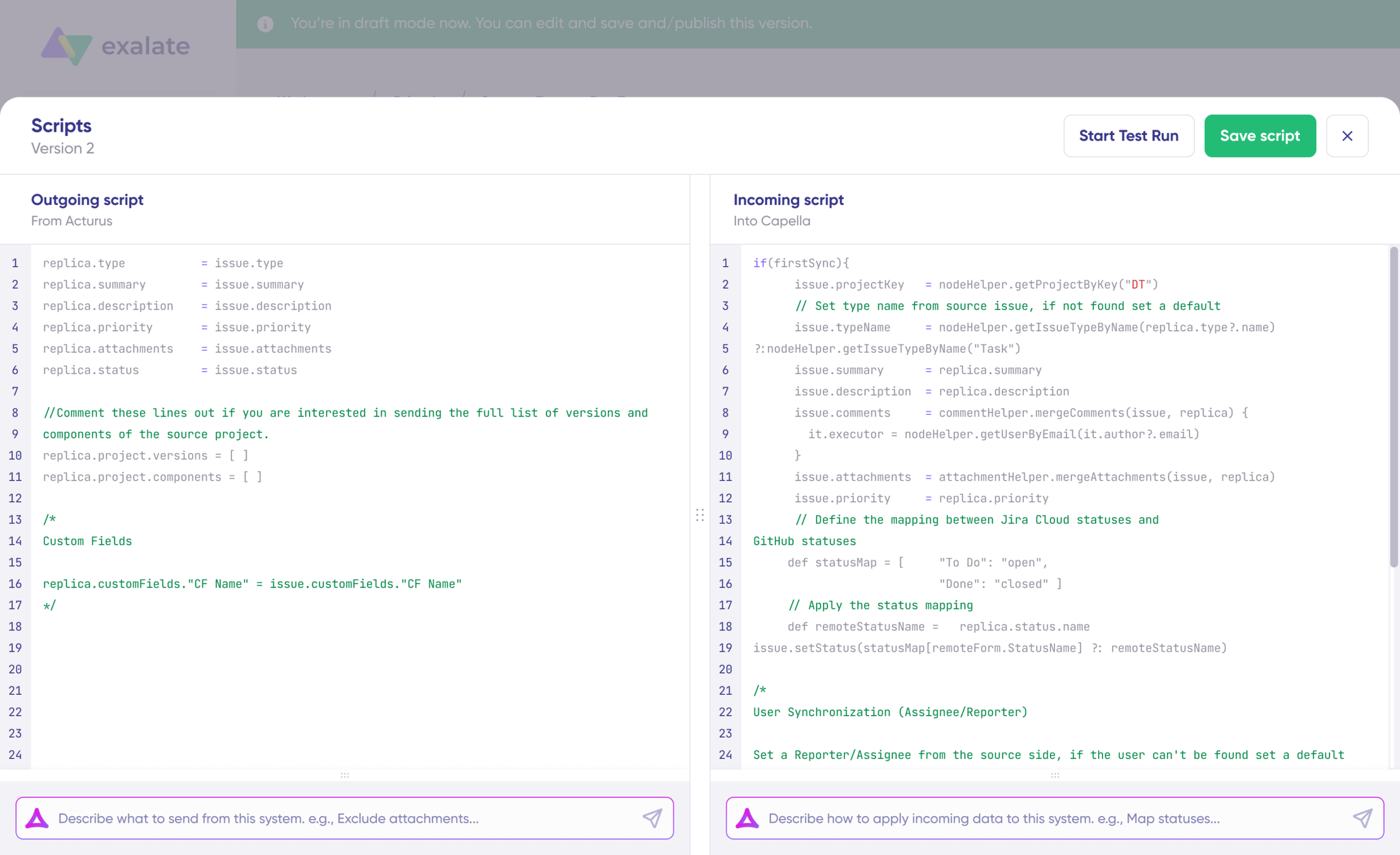
Sync rules use Groovy-based scripts, divided into incoming and outgoing for each system.
Option 1: Write Sync Scripts Manually
If you’re comfortable with scripting, click “Edit” to open the script editor. Define what data leaves your system (outgoing) and how incoming data should be applied (incoming).
Option 2: Use Aida (AI-Assisted Configuration)
Describe what you want in plain language:
- Outgoing: “Exclude attachments” or “Only sync high-priority work items”
- Incoming: “Map statuses” or “Set a default assignee if user not found”
Aida generates working Groovy scripts based on your requirements. Review the changes (green = added, red = removed), then choose “Insert” or “Discard”.
Step 5: Test Before Going Live
Click “Start Test Run” to validate your configuration without affecting production data.
Select work items to test, then preview:
- How sync rules will be applied
- Field mappings for each item
- Incoming and outgoing replicas
Adjust scripts if needed, test again, then click “Publish Version” when everything looks correct.
Step 6: Set Up Triggers
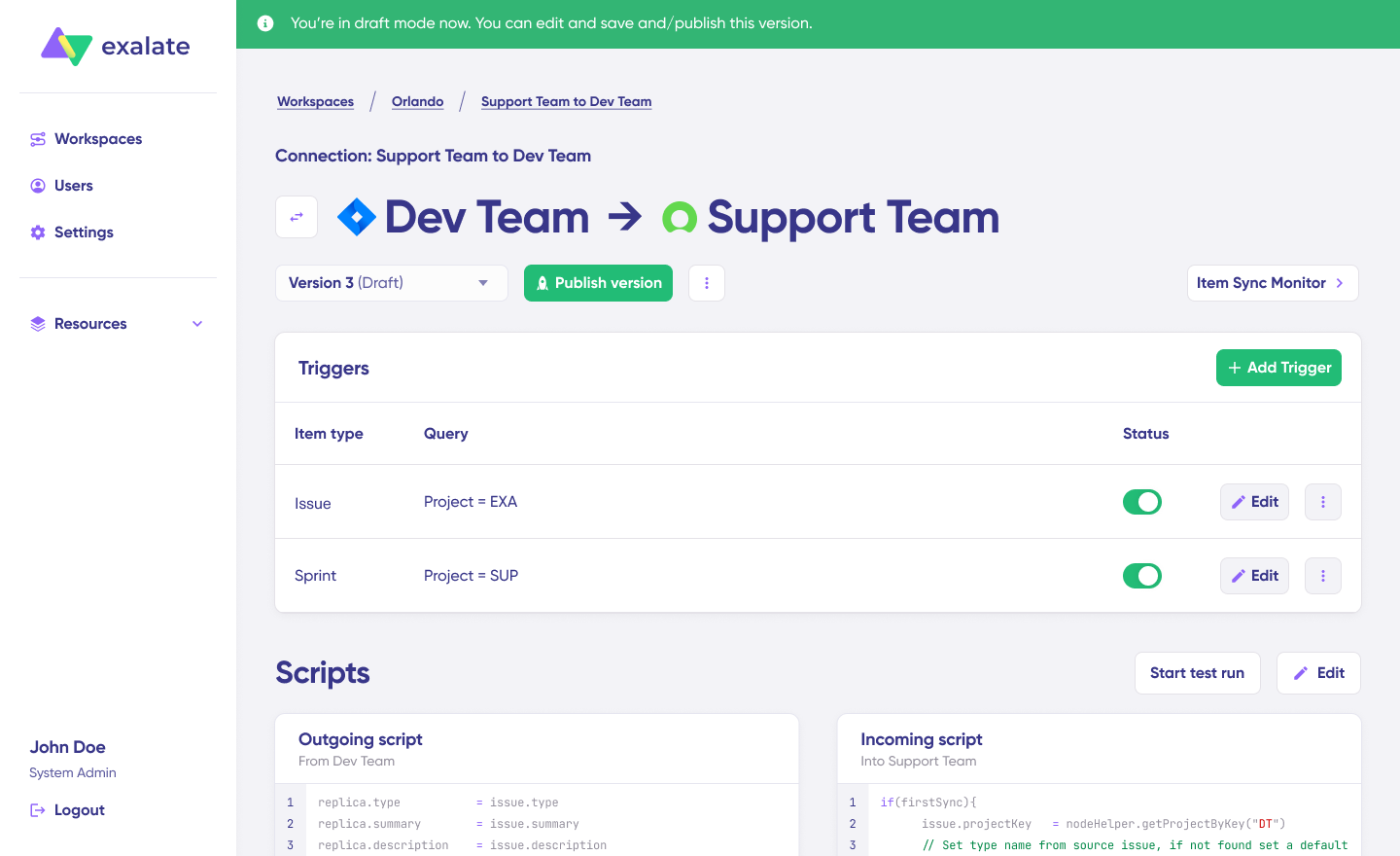
Triggers define which items sync automatically. Click “+ Add trigger” and specify conditions:
- Jira: Use JQL (e.g., label = “dev”)
- ServiceNow: Use advanced search syntax (e.g., assignment group filters)
Save and publish your triggers.
Step 7: Monitor and Troubleshoot
Your synchronization starts automatically based on your rules and triggers.
If errors occur, go to the “Troubleshooting” tab. Hover over any error and click the Aida icon for context-aware suggestions and proposed solutions. You can view full analysis, error details, or replicas in JSON format.
How To Switch from Exalate Classic to New Exalate
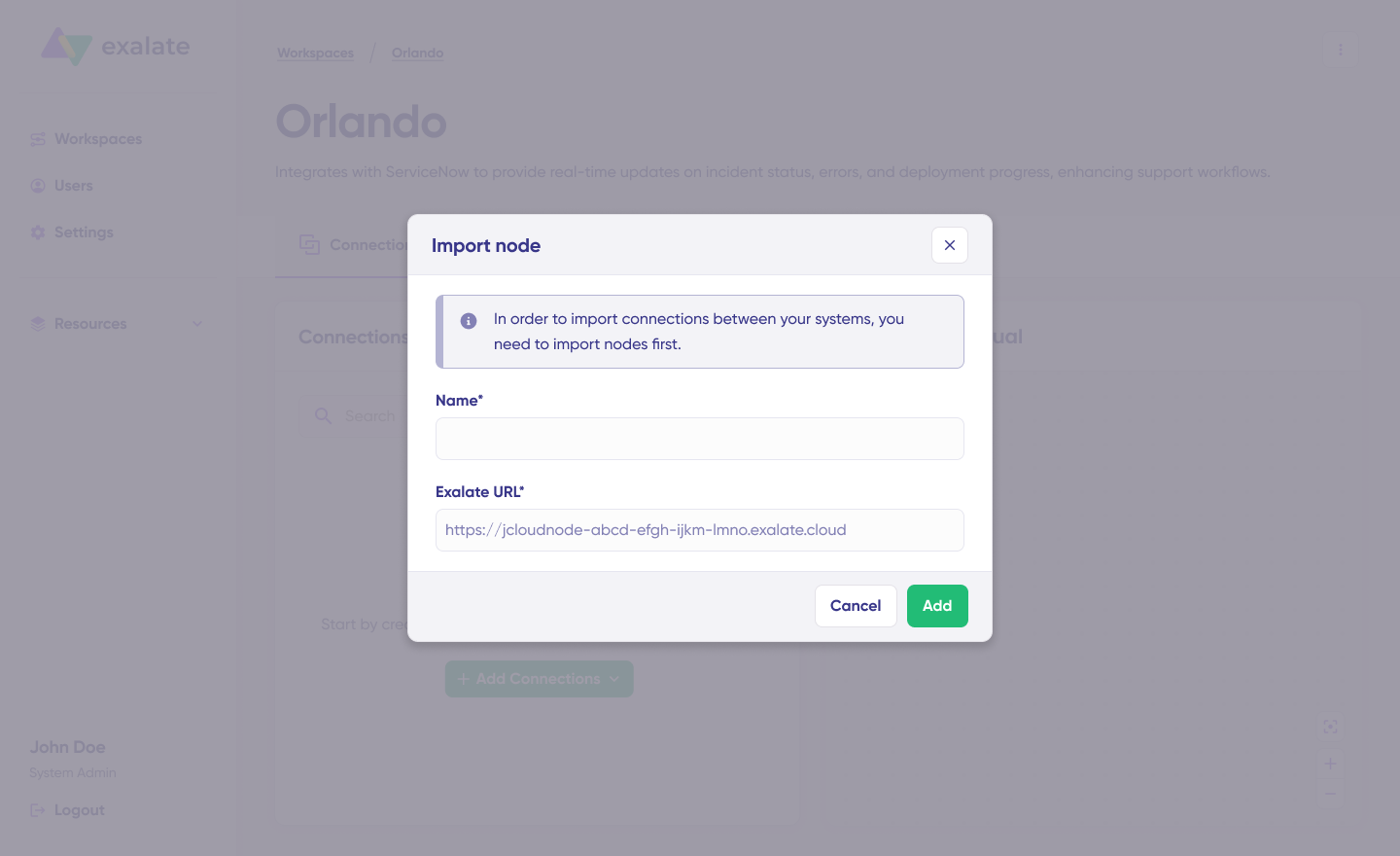
You can switch from Exalate Classic to the New Exalate experience by importing your existing connections.
Use the Import Existing Connections feature to bring your current integrations into New Exalate. Your sync rules transfer automatically, no rebuild required.
What Comes Next
This is the first step. More improvements are on the way:
Trust Levels and collaborative integrations: Granular access control for team-based integration management.
Enhanced AI capabilities: Aida will evolve to help with planning and building integrations, not just scripting.
Additional connector support: More platforms joining the new experience, including GitHub, Azure DevOps Server, and more.
We’re building in public, and we want your input. If you have feedback or questions, reach out at product@exalate.com.
Frequently Asked Questions
Will my existing Exalate Classic integrations stop working?
No. All existing integrations continue running unchanged. There’s no deadline for switching to New Exalate. You can do that whenever you’re ready.
Do I need to rewrite my scripts from Exalate Classic?
No. All your existing Exalate Classic Groovy scripts work as they are in the new experience. You can also choose to import connections with their configurations intact.
What happens to my Exalate Classic license?
Your Exalate Classic pricing remains unchanged until you choose to transition to the new subscription model.
Can I use both experiences simultaneously?
Yes. You can run Exalate Classic integrations while exploring the new experience. When you’re ready, import connections to the new console.
What’s the difference between Exalate Classic and New Exalate?
Exalate Classic was based on a Groovy-scripting engine that required installation on both sides, so you had to pay for all integrating systems.
The New Exalate experience changes this model, so you no longer need to pay for both sides or install Exalate on all your systems.
New Exalate works as a standalone web interface that can be accessed through exalate.app. This new experience adds unified management for your connections, Test Run functionality, script versioning, and Aida AI assistance, while keeping the same scripting engine and independent operational control you rely on.
How does outcome-based pricing work?
You pay for active work items currently in sync between systems, not for user seats or transaction volumes. If you sync 100 work items between Jira and Azure DevOps, you pay for those 100 active sync pairs.
Is New Exalate suitable for intra- and cross-company integrations?
Yes, New Exalate can work for both intra-company and cross-company basic to advance integrations, though granular Trust Levels are still in development. The current “High Trust” mode works well for all your integrations. Full collaborative integration features are coming soon.
Which platforms are supported in the New Exalate experience?
The New Exalate supports Jira, ServiceNow, Asana, Azure DevOps Cloud and Server, Zendesk, Salesforce, Freshservice, and Freshdesk. In addition to this, it has some connectors in early access like Ivanti, Xurrent, Halo ITSM, & more. You can request custom connectors, best for enterprises looking to integrate their legacy systems or exotic toolsets.
How do I switch to New Exalate from Exalate Classic?
Use the Import Existing Connections feature in the New Exalate console. Select your existing nodes and connections, and your sync rules will transfer automatically. No rebuild required.
The Bottom Line
New Exalate is an evolution, not a replacement. Your current integrations keep working. Your scripts stay intact. Your operational control remains unchanged.
What’s new is clarity, one place to understand every connection, safer testing before deployment, and AI assistance to help you work faster.
Switch when you’re ready. Classic keeps running.
Built by engineers. Refined by reality. Yours to run.
Need help deciding if Exalate is right for your integration needs? Contact our team or start a free trial to test New Exalate.